
For businesses
Turn events into a calendar that pays ahead
Mosey · 15 November 2026 · 11 min read
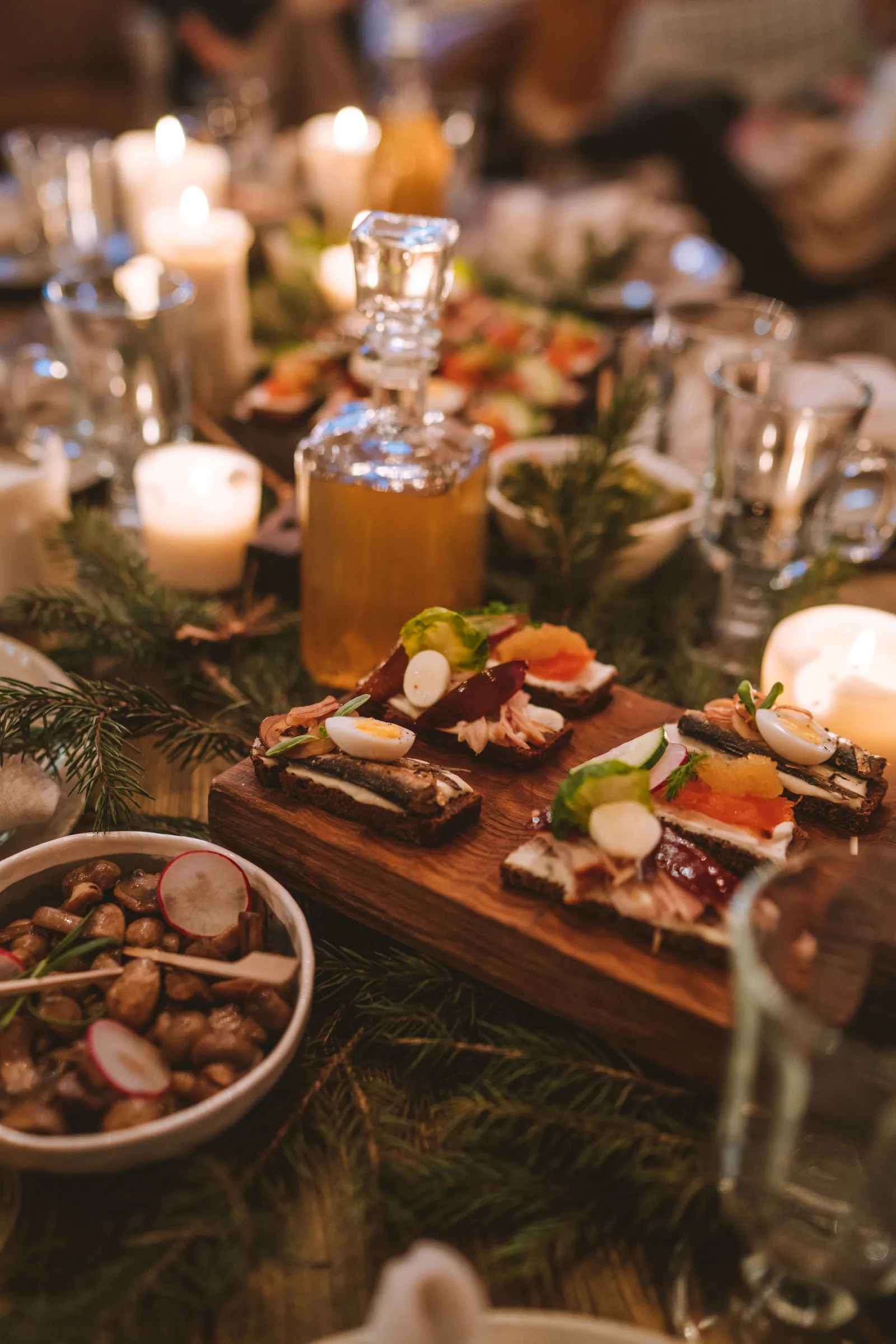
The restaurant events that pay in Ireland are the ones sold as tickets before the night: a supper club, a tasting, a class or a live evening on your quietest weekday. Cost the night first, cap the seats at what your kitchen can plate well, sell tickets weeks ahead and repeat the format every month. Your calendar then fills with money you have already taken.

Why does a quiet night cost you money?
A Tuesday with nothing on is a fixed cost with no income. The rent, the heating, the insurance and most of the rota are the same whether forty people come or four.
Most owners try an event to fix that, and most try it once. They pick a date, post about it, cater for a guessed number and hope. Some nights are lovely and lose money. Others sell nothing, and the owner decides events do not work here.
The problem is rarely the idea. A single event has no rhythm: no list of people who came last time, and everything built from scratch.
A calendar changes that. When a Thursday supper happens on the same night every month, guests plan around it, your kitchen shops and preps the same way each time, and the second night is far easier to sell than the first. The money arrives before the night, because a ticket is paid for when it is bought. That money is for dinners you still owe, so have a plain answer ready for the guest who cannot come.
Which events suit a restaurant or café?
Choose a format your kitchen can deliver the same way twice. The test is simple: can you plate it for a set number of guests, at a set time, without breaking your normal service?
| Format | Why it sells | What to watch |
|---|---|---|
| Supper club or set-menu night | A fixed menu and a known head count | Seats are limited by the pass, not the chairs |
| Wine, whiskey or beer tasting | A producer or importer gives it a reason | Alcohol costs and the pour per head |
| Cooking or baking class | Guests leave with a skill | Equipment, a smaller group, an end time |
| Guest chef or producer night | A name that is not yours | The guest's fee against the ticket |
| Live music or quiz night | Regular and easy to repeat | Music licences, noise and a fixed finish |
| Seasonal dinner | Christmas, harvest or a spring menu | Book early and cap the numbers |
Guides for each: the supper club guide, the wine tasting guide, the cooking class guide and the pop-up guide. If music is involved, read the music licence guide before you set a price.
Two things are not ticketed events. A private hire is a group booking with a quote: see the private hire pricing guide. An early evening menu is a price on normal service: see the early bird menu guide.
How do you cost a night before you sell a ticket?
Add every cost of the evening, divide by the seats you can serve well, and add your margin. The ticketed event guide has the full line-by-line sheet. Here is what matters when you are planning a whole calendar rather than one night.
An example, with your own figures to replace mine. A Thursday supper for 30 guests at a ticket price of 60 euro. Food 420, drink 210, staff 260 and extras such as printing and candles 80: a cost of 970 euro. These are round figures for illustration, not a benchmark.
| How full the night is | Tickets sold | Ticket income | Left after the 970 cost |
|---|---|---|---|
| Sold out | 30 | 1,800 | 830 |
| Four in five | 24 | 1,440 | 470 |
| Three in five | 18 | 1,080 | 110 |
All of these are before the fees on the ticket and before a value on your own time. Run that night ten times in a year and the left-over is about 8,300, 4,700 or 1,100 euro. The lesson is sell-through. A supper that fills most of its seats is a business line. One that fills little more than half is a favour to your guests.
So plan for a smaller room that sells out. Twenty-four seats with a waitlist beat thirty that sell eighteen. If you have not sold your break-even tickets a week or two out, change the price, the menu or the date before you buy the food.
On fees, Mosey has no subscription for events. When a ticket sells, Mosey takes 4% of the ticket price plus VAT on that commission, and Stripe's card fee is passed through at cost. The payment goes to your own Stripe account. The guest pays a flat booking fee of €1.29 (VAT included) on top, not out of your price. The price preview in the event form shows what you keep from one ticket, so check it before you publish. See the pricing page.
How do you build a twelve-month calendar?
Start with one anchor and add around it. Anchors beat a crowded diary, because a regular that guests can name sells itself.
- Pick the anchor. One recurring night on your quietest weekday: the last Thursday of the month, say. Keep the day fixed.
- Pick two or three specials. A producer night, a class or a seasonal dinner that guests will mark as an occasion.
- Leave the busy weeks alone. Put events in the thin weeks, and check your own bookings first.
- Announce the next date on the night. Say it from the floor and print it on the menu. The people in the room are your best buyers.
- Review each quarter. Keep what sold out and drop what you dreaded running.
Mosey can copy an event to new dates for you. You can repeat it every one to eight weeks, for up to twelve copies at a time, with its ticket types, capacity and price, and the early bird deadline moves with each start. Followers are not notified for each copy; only an event you create from scratch tells them.
How do you sell the seats so the night sells out?
A ticket sells when the guest knows what they get, how many seats there are and when the offer ends.
- Describe it plainly. What is included, how long it runs, who is cooking or hosting, and how to tell you about allergies. Ask for dietary needs at purchase, not on the night.
- Offer ticket types where they help. A night with and without a wine pairing is two tickets at two prices. Mosey lets you add up to eight ticket types to an event, each with its own capacity.
- Use an early price with a deadline. Set an early bird price below the standard price and an end date. A deadline makes people decide.
- Limit tickets per person. You can cap how many one buyer can hold, from one to twenty, which stops one table taking the room.
- Tell your members first. An event can be members only, or open to your members for a set time before everyone else. See the supper club membership guide for how a membership and a monthly night fit together.
- Let people know. Publishing a new event tells your followers. A counter card, a menu line and a post a week out do the rest. Mosey Boost reaches people who agreed to hear from you and shows its price before you pay.
Say the number of seats on the page. "30 seats" is more honest and more persuasive than a vague invitation.
What happens when the night sells out?
A sold-out night is not a dead end. Guests who miss out can join a waitlist, and that list is the best sign you have for the next date.
On Mosey, a guest who joins the waitlist is offered a freed seat, and has 24 hours to claim it. Guests can choose automatic purchase instead. They save a card, and when a seat opens they are told it will be charged in about a day, and they can cancel from the waitlist to opt out. If the offer is not claimed, it passes to the next person. If a guest gets a ticket another way, their waitlist entry closes. A member-only night also asks the guest to be a member before they can join.
You see how many people joined and how many claimed a seat in the event's numbers. A long waitlist for a 24-seat night tells you what to do next: add a second date, rather than squeeze more chairs in.
How do you run the door on the night?
The door should take a minute per party, not a queue of people being found on a list. Decide it in advance.
- Scan the ticket. Staff scan from the Events page or at the counter. A scan is checked against the ticket's signature, so a code made up for someone else's ticket is refused.
- Admit part of a party. If two of four arrive early, check those two in. A second scan of a ticket that is fully in is refused, so the same ticket cannot be used twice.
- Use the guest list. It shows who holds a ticket, how many seats, how many are in and who is waiting. You can select several tickets and check them in together, up to two hundred at a time, and export the list.
- Name comps and door sales. A complimentary ticket for a friend of the house or a performer's plus one is entered as a named ticket by someone with the marketing permission, because it gives a seat away. A ticket sold at the door for cash is recorded as a named ticket too, so your headcount stays true. Mosey takes no payment and no commission on a door sale.
- Door tags, if you want them. You can switch on self check-in, so a guest taps a door tag to check themselves in. It is off until you set it.
What if a guest cannot come, or you have to cancel?
Say it before the sale, in writing, on the ticket page.
For a night on a set date, the 14-day cooling-off right that applies to many online purchases does not apply. The CCPC's guide for businesses lists leisure activities booked for a set date or period among the exemptions, and it requires you to tell consumers, before they buy, whether they have a legal right to cancel. Where a right to cancel does apply, it says that if you do not give that information, the cancellation period extends by 12 months. So a ticket page that states your cancellation terms is not a nicety: it is part of selling the ticket properly. (This is not legal advice. Check your own terms with your solicitor.) The rule is different for other things you may sell beside the event: vouchers and a membership's first cycle carry a 14-day right on Mosey, so keep those separate in your mind.
You then choose a policy. Three work for most restaurants and cafés:
- Free cancellation up to a cut-off. You set it in hours before the start, from zero to 720. Until then a guest can cancel in the app for a full refund, and the seat goes back to the waitlist.
- Transfer to a friend. A guest can offer a ticket to another Mosey user, who has 24 hours to accept.
- No refund after the cut-off. Free tickets can always be given back until the event starts.
If you move the night by an hour or more after tickets have sold, guests who bought before the move can cancel for a full refund for seven days.
If you cancel the event, Mosey refunds every confirmed ticket and tells each holder. That is why an event that has sold a ticket is cancelled or hidden, never deleted. For a change of room or a late start, you can message ticket holders from the event, up to five times in 24 hours. It is for service messages, not marketing.
How do you read the numbers and repeat what works?
Look at the same four things after every night:
- Tickets sold against seats, by ticket type.
- Takings, against your estimate.
- Seats in the door, against tickets sold, so you see how many did not come.
- Waitlist, how many joined and how many claimed a seat.
Write down what ran over, what was wasted and what guests said, and compare the night with a normal Thursday. Repeat what sold out. Change the price or date of what did not. Drop what drained you. By the third night of a regular supper you can say what it earns and how many seats sell a week out. That is a line in your cash flow, not a hope.
What can you do this week?
- Pick your quietest weekday and the one format your kitchen can plate for 20 to 30 people.
- Cost it using the ticketed event guide, and find your break-even number of tickets.
- Write your cancellation terms in two sentences.
- Pick the first three dates, one a month apart.
- Open the event form, set the seats, the early price and the deadline, and check the price preview.
- Tell your regulars face to face before you tell anyone else.
The event tickets feature page shows each of these steps on screen, and the event ticket guide walks through publishing. More in the guides for food businesses.
When you are ready to put the first night on sale, Host on Mosey, connect your Stripe account and publish your first ticketed night this week. Hosting is free, and you pay a commission only when a ticket sells.
This guide is general information, not legal, tax or financial advice. Rules change and depend on your business and where it is, so check the current rule with the official body named in the guide and take advice from a solicitor or accountant in your area before you act.
Questions
Common questions
What events can a restaurant or café run to fill a quiet night?
A supper club, a tasting, a cooking or baking class, a guest chef or producer night, a quiz or a seasonal dinner. Choose a format your kitchen can plate the same way twice, for a set number of guests, and sell it as tickets in advance.
How many tickets should I sell for a restaurant event?
Sell the number your kitchen can plate and your team can serve well at once, not the number the room holds. A smaller night that sells out with a waitlist beats a larger one that sells half. Work out your break-even tickets before you publish.
What does Mosey charge on event tickets?
There is no subscription. Mosey takes 4% of the ticket price plus VAT on that commission, and Stripe's card fee is passed through at cost. The guest pays a flat booking fee of €1.29 on top. The pricing page lists every rate.
Do customers have a 14-day right to cancel event tickets?
Not for a night on a set date. The CCPC lists leisure activities booked for a set date or period among the exemptions, but a business must tell the customer, before they buy, whether a right to cancel exists. State your own cancellation terms on the ticket page.
What happens if my event sells out on Mosey?
Guests can join a waitlist. When a seat frees up, the next person has 24 hours to claim it, or can choose to have a saved card charged automatically. A guest who gets a ticket by another route is taken off the list.
How do I check guests in at an event?
Scan the ticket from the Events page or the counter, or use the guest list to check in one party or several at once. A party can arrive in parts, and a ticket that is already fully in is refused a second time.
What if I have to cancel an event I have sold tickets for?
On Mosey, cancelling the event refunds every confirmed ticket and tells the holders. If you only move the date by an hour or more, guests who bought earlier can cancel for a full refund for seven days.
How do I run the same event every month on Mosey?
Create it once, then copy it to new dates every one to eight weeks, up to twelve copies at a time. Copies keep the ticket types, capacity and price. Your followers are told about the new event, not about every copy.
More like this
Read next
A hotel restaurant that locals use too
A hotel dining room earns local trade when it acts like a restaurant of its own. Here is why locals stay away, how to set the dining room up on Mosey beside your hotel, and which offers fill it.
An alcohol-free drinks menu that still makes margin
More guests are drinking less, in January and the rest of the year. Here is how to cost, price, name and sell an alcohol-free menu so it earns as well as the wine list, with the Irish VAT and offer rules checked.
A pub that does food: making the kitchen pay
A pub kitchen pays when its gross profit covers its own wages and running costs. Here is how to count it, which services to fill, what the alcohol rules say and how Mosey fits.
Auto-enrolment pension for Irish restaurants and cafés: what you pay and do
Since 1 January 2026 an Irish employer matches the pension contribution of each eligible employee. Here is who counts, what it costs on a wage bill, the payroll steps and what staff can opt out of.
Get started
Host your business on Mosey. It is free to claim.
Free to list, no set-up fee, and Order Ahead is 1.5% commission when you start taking orders.