
For businesses
Group orders and split bills: end the queue at the till
Mosey · 15 November 2026 · 12 min read
To end the queue at the till, decide how each kind of group pays before it arrives. At the table, split the bill by item or equally on the till as the food goes out. For friends ordering collection or delivery, let each guest pay their own share before the kitchen starts. For a big booking, take the deposit in shares.
How much does a split bill really cost your restaurant or café?
The cost is not on the receipt. It is the time your most experienced waiter spends at the till working out who had the starter, who shared the wine and whether the birthday person pays. It is the next table waiting to settle up, and the mistake nobody spots until the till is short at close.
Here is an example, with made-up numbers. A Friday evening has five tables of six or more, and each asks to split. If sorting each one out takes four minutes, that is twenty minutes of a trained person's time in the busiest hour, plus a queue. Time your next three splits to get your own figures.
The same problem has a second form that never reaches your till. One friend books or orders for the group, pays for everything and chases the others for weeks. That person is out of pocket and may not organise the next night.
There are two jobs here, and they need different tools. The first is dividing a bill at a table after the meal. The second is getting a group to pay their own part before the food is made, whether that is a collection order, a delivery or a deposit on a booking. The rest of this guide takes each in turn.
Which kind of group are you actually serving?
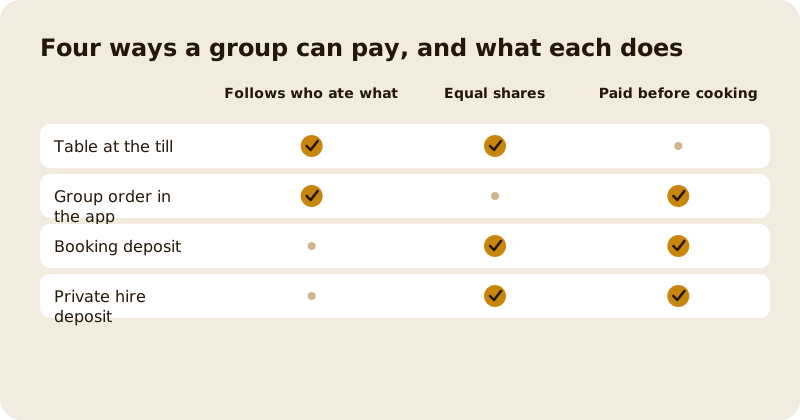
"Splitting the bill" is four jobs, and the money should move at a different moment in each.
- A table eating in. The bill is open until the end. Split it on the till, by item or equally, and let each guest pay the way they like.
- Friends or colleagues ordering for collection or delivery. The order does not exist until someone pays. Let each person pay for what they chose, so the whole order is covered before your kitchen starts.
- A booking with a deposit. The deposit is the commitment. Share it across the group so one person is not lending the rest.
- A private hire or a long table. The deposit is bigger and the date matters more. Shares can be equal or set person by person.
The grid above compares them. A table settles after the food, while the other three can be settled before you cook anything. Wherever a group can pay before the food is made, take that option, because a guest who has paid is a guest who turns up.
If you take collection orders, the guide to click and collect covers the slots and caps that sit around a group order.
How do you split a table's bill at the till without the sums?
Do it as the meal goes, not at the end. Ask when you take the order: "Would you like to pay together or separately?" A table that has told you early costs nothing at the till later.
On the Mosey web till, which runs in a browser on a tablet or laptop, a bill has three ways to pay: pay it all, split it equally, or pay by item. Staff choose one, and the till does the arithmetic.
- Split equally divides what is left by the number of guests, from two to ten. Every share but the last is rounded down, and the last takes the remainder, so the shares always add up to the bill exactly.
- Pay by item lets staff tick the lines each guest had. Discounts are shared out fairly across the ticked lines, so nobody argues about whose drink was cheaper.
- Pay 1 of 2 separates a line with a quantity of two or more, for example two portions of chips, so each can be ticked for a different guest.
You can pay some items first and then split the rest equally. Once an equal share has been taken, paying by item is no longer offered, so the till never counts a line twice.
Each guest can pay their share in cash, with a card on your own card reader, through Mosey Pay on their phone, or with a voucher. The server works out every amount, so a share cannot be typed wrong. Loyalty for the visit follows the bill: it is earned when the bill closes, so a bill paid in three parts counts as one visit.
Should the table pay by item or equally?
Neither is right for every table. Give your staff a rule of thumb so the decision takes seconds.
- Pay equally when the table ordered to share, when the food and drink were similar in price, or when a group of friends says "we'll sort it out between us". It is the fastest option.
- Pay by item when one guest ordered a starter, a steak and a bottle while another had a side salad. It is fairer, and it protects the guest who would otherwise subsidise the table.
- Mix them when most of the table shared plates and one or two ordered separately. Take the separate items first, then split the rest equally.
- Decide at ordering, not at the bill.
Write the rule on a card by the till, and practise it in a quiet hour with a pretend table.
The guide to doing without a card machine covers the wider question of how guests pay at the table.
How does a group order work when every friend pays their own share?
A group order lets friends or colleagues build one basket together in the Mosey app and pay for their own food, so nobody fronts the lot.
Here is how it runs:
- One customer starts the order at your restaurant or café and invites friends by their Mosey username. Friends need the app and an account.
- Each person adds their own items to the shared basket, with their name beside every dish, so you and the kitchen can see what belongs to whom.
- The organiser starts the split. From that moment the basket is locked, so nobody can change it while money is moving.
- The whole basket is priced once, with every discount, voucher and fee applied exactly as on a normal order. Then each guest gets a share worked out from what they ordered, and pays it by card on their own phone.
- When every share is paid, the organiser finishes the order and it reaches your kitchen as one order.
The shares follow the food, not the head count. Here is an example with made-up numbers: four colleagues order items worth 24, 18, 12 and 6 euro, and the order carries a 10 percent discount. Each pays the same 10 percent off their own items: 21.60, 16.20, 10.80 and 5.40. Fees and VAT are spread by the same proportion. The shares add up to the total to the cent, with the last guest absorbing any rounding.
That one rule ends the argument about who owned the discount, and a guest who had a salad never pays for a steak.
Two practical limits are worth telling your customers. The split adds no tip, and it needs friends who are on Mosey. For a group that includes people without the app, a table at the till is the better route.
Each person who pays earns loyalty on their own share, not only whoever started the order. Everyone who paid is told when the order is placed.
Mosey explains the set-up for owners on the split the bill feature page, and the guide to taking orders for collection shows how group orders sit beside your normal orders.
What if one guest does not pay, or wants their money back?
This is the question that makes owners nervous. The answer: nothing is cooked until the money is in.
| What happens | What the system does |
|---|---|
| A guest never pays their share | The order is not placed. The split carries a short window, and one left unfinished expires, so the basket opens up again. |
| The organiser cancels the split | Every share already paid is refunded to the guest who paid it, and anyone who has not paid is released. |
| Everyone paid but the organiser never finishes the order | The shares are refunded automatically after about two hours, so nobody is left paying for food that never came. |
| One guest wants their money back after the order is placed | You refund that single share from the order, and the other guests' payments are untouched. |
You need the issue refunds permission to refund a share, so decide who on your team holds it. A refund of one share does not cancel the order. Cancelling and refunding stay separate decisions, as they do for any order.
Because the order is only placed when every share is paid, you are never chasing a table for money for food already cooked. For an office lunch or a big family takeaway, the risk moves from you to the organiser.
How do you split a deposit for a big booking?
A deposit works best when it is shared. A birthday of twelve with a set-menu deposit is a lot for one person to put on a card.
On Mosey, a booking with a deposit can be split across the group. The organiser saves a card first, then invites guests, and the deposit is divided into equal shares between the organiser and each guest. Each guest pays their own share in the app. Guests need Mosey accounts, and deposits start on the Starter bookings plan at €79.99 a month.
The saved card is your safety net, and it runs on a timetable you can explain to a nervous organiser:
- Twenty-four hours before, the organiser is asked to pay the rest now, remove the guests who have not paid, or cancel.
- Twelve hours before, anything still unpaid is charged to the organiser's saved card.
- If that charge fails, the booking is released rather than left half paid, and everyone who paid a share is refunded in full.
If you cancel or decline the booking, every guest who paid a share is refunded in full too. The organiser can also remove a guest. A removed guest who had paid is refunded, the party shrinks by one, and any gap in the deposit becomes the organiser's to cover.
The guide to reservations and deposits covers setting the deposit and the cancellation window, and the guide to group and private hire bookings covers quotes and dietary needs. A reservation deposit carries no Mosey fee on any plan.
For a private hire or a gathering, shares can be equal or set person by person, up to forty shares. Each share is its own payment, and the usual gathering deposit commission of 4.5% plus VAT is worked out on the share. The guide to pricing private hire covers what to charge.
What does splitting the bill cost you?
Splitting has no price of its own. You pay the usual rate for the kind of order, and the usual rate for the kind of payment.
- A group order for collection carries the 1.5% commission on the food, before VAT on Mosey's fee.
- A group order for delivery carries the 6% delivery commission on the food.
- A table settled through Mosey Pay carries the in-store fee of 0.5% on the bill, capped at €149 a month across the till and Mosey Pay. Cash carries no Mosey fee, and a card on your own reader is recorded as external, also with no Mosey fee.
- A booking deposit carries no Mosey fee. A gathering deposit carries the commission above.
There is one honest cost to weigh. Each guest's share is its own card payment, so the card processor's fixed fee applies to each one. On a group order in the app, the guest's booking fee covers one card charge, and your business bears the fixed fee on every extra share. At the till, each share paid by card or Mosey Pay carries its own fixed fee, as any card payment does. A split across eight guests has eight fixed fees where one payment would have had one. For a table of two, that can outweigh the saving in staff time. For a table of eight with a queue behind it, it rarely does. The card payment fee calculator on the business tools page helps you check your own mix, and the pricing page lists every rate.
How do you set it up and brief your team?
Most of the work is people, not software.
- Connect Stripe and wait for it to verify. Customers cannot pay shares until your account is verified, and every share goes to your own account.
- Switch on collection or delivery orders. Group orders work on every order that comes through the app, so there is nothing separate to enable.
- Keep your menu and prices current. A share is worked out from the items in the basket, so what guests pay is what is on your menu.
- Give the right people the right permissions. Staff taking shares at the till need the take payments permission, and whoever refunds a single share needs the issue refunds permission.
- Write a one-line rule for the till. "Ask at ordering. Equal for shared tables, by item for the rest."
- Practise once. Invite a friend to a group order at your own restaurant or café and pay a share each. Then split a pretend table at the till.
- Tell guests you do it. A line on your page and a card by the till reaches the groups who would otherwise choose a busier room.
Then watch the first week: how often groups split, how long each takes and how many group orders arrive.
When you want the queue gone for good, Host on Mosey and connect your Stripe account. More in the guides for food businesses.
This guide is general information, not legal, tax or financial advice. Rules change and depend on your business and where it is, so check the current rule with the official body named in the guide and take advice from a solicitor or accountant in your area before you act.
Questions
Common questions
How do I split a bill between several people in a restaurant?
Ask early, then split at the till. On the Mosey web till you can split equally between two and ten guests or tick the items each guest had, and each guest can pay in cash, by card or through Mosey Pay. Staff do no sums.
Is it better to split a bill equally or by item?
Equally is fastest and suits a table that shared plates and drinks of similar value. By item is fairer when guests ordered very differently. You can also pay some items first and split the rest equally, which suits mixed tables.
How can customers pay for a group order separately?
On Mosey, one customer starts a group order in the app and invites friends. Everyone adds their own items, the whole basket is priced once and each guest pays their own share by card. Once every share is paid, the organiser places the order.
What happens if someone in a group order does not pay?
The order is not placed, so your kitchen cooks nothing. The organiser can cancel the split and every share already paid is refunded to the guest who paid it. An unfinished split also expires on its own.
Can I refund one person from a split group order?
Yes. You can refund a single guest's share from the order, if your team permissions allow you to issue refunds. The other guests' payments are untouched, and cancelling the order stays a separate decision.
Can guests split the deposit for a large booking?
Yes. On Mosey the organiser saves a card, invites guests and the deposit is divided into shares that each guest pays in the app. Anything unpaid 12 hours before is charged to the organiser's card. Deposits start on the Starter plan.
Does splitting a bill cost extra on Mosey?
Splitting has no price of its own. A group order carries the usual 1.5% collection or 6% delivery commission, and a till payment through Mosey Pay carries 0.5%, capped at €149 a month. Each guest's card payment carries the processor's fixed fee, and on a group order your business bears it for each extra share. The pricing page lists every rate.
Do my customers need the Mosey app to take part in a group order?
Yes. Friends are invited by their Mosey username and pay their share in the app, so each needs an account. For a mixed group, or a table in your restaurant, split the bill at the till instead, where guests pay however they like.
More like this
Read next
A hotel restaurant that locals use too
A hotel dining room earns local trade when it acts like a restaurant of its own. Here is why locals stay away, how to set the dining room up on Mosey beside your hotel, and which offers fill it.
An alcohol-free drinks menu that still makes margin
More guests are drinking less, in January and the rest of the year. Here is how to cost, price, name and sell an alcohol-free menu so it earns as well as the wine list, with the Irish VAT and offer rules checked.
A pub that does food: making the kitchen pay
A pub kitchen pays when its gross profit covers its own wages and running costs. Here is how to count it, which services to fill, what the alcohol rules say and how Mosey fits.
Auto-enrolment pension for Irish restaurants and cafés: what you pay and do
Since 1 January 2026 an Irish employer matches the pension contribution of each eligible employee. Here is who counts, what it costs on a wage bill, the payroll steps and what staff can opt out of.
Get started
Host your business on Mosey. It is free to claim.
Free to list, no set-up fee, and Order Ahead is 1.5% commission when you start taking orders.