
How to
Dashboard: tables, the floor plan and the front of house screen
Mosey · 23 October 2026 · 3 min read
Tables, Floor Plan and Front of house are the Reservations pages that turn a list of bookings into a room. In Tables you add each table with its capacity; in Floor Plan you draw the room; Front of house shows a live view of which tables are seated, running late or paying. Table assignment, combining tables and the live floor view are part of the Host plan, and the pages appear for every plan so you can see what they do.
What do the Tables and Floor Plan pages do?
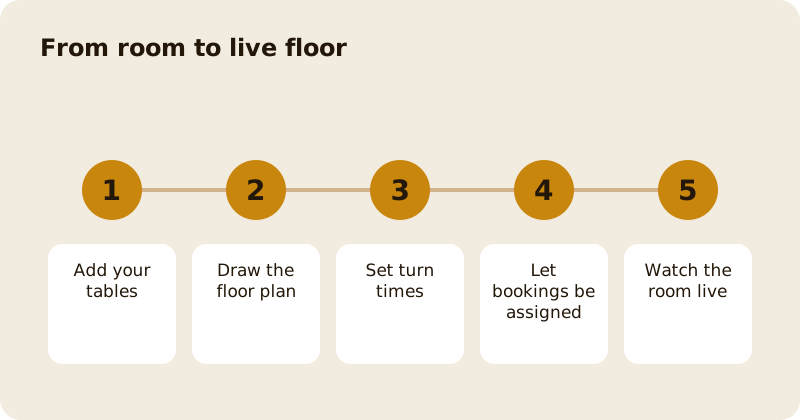
Tables lists your tables with their areas, shapes and capacities. Add every table, including the ones you only use on busy nights. Set a turn time per table where it differs, because a two-top by the window does not turn like a six-top at the back. A table can be part of a combination, so that two four-tops can seat a party of eight.
Floor Plan is the drawing. Place the tables as they stand in the room, group them into areas such as bar, terrace and main room, and save it. Hosts and managers use it to see where a party will sit.
On a free or Starter plan these pages show what Host adds, with an upgrade option, rather than the working view.
What does the system do with them?
With a floor plan it can assign tables itself, combine tables for a large party, and hold back a walk-in reserve so you are never fully booked by phone. It uses the booking's duration, or your default turn time, or the per-table override, in that order. The occupancy figure uses your maximum covers per slot less the walk-in reserve; if you have not set those, it falls back to the sum of your tables' capacities, so a new venue still gets a sensible number.
What is Front of house?
A live view of the room. Each table is coloured by its state: available, reserved soon, running late, seated early, seated late, overrunning, billing or completed. It refreshes every few seconds, including on a wall-mounted tablet that has gone to the background. Seeing a table that is billing tells you it is nearly ready; seeing a table that is overrunning tells you the 8pm will wait.
The page is built for a host stand. Use it on a tablet, not a phone. Several staff can share it, and on the Host plan a PIN protects it.
What about the guest's side?
Guests booking see times that fit your room, not times that your tables cannot hold. A party that is too large for your settings is offered the gatherings route instead. Read the private hire and large group guide.
How do you set it up in an hour?
- List every table with its capacity and area.
- Draw the floor plan from the front door.
- Set the default turn time for lunch and dinner, then override the odd table.
- Set your walk-in reserve.
- Make a test booking and check where it lands.
- Show the team the Front of house screen at a quiet pre-service briefing.
Change one thing at a time, and look at the effect for a week.
Where does this sit among the other pages?
The bookings list and calendar are in bookings, the calendar and cancellations; the rules and deposits are in settings, deposits and plans. The product guide is reservations and deposits. The walk-in queue works beside it.
Questions
Common questions
Which plan includes the floor plan?
The floor plan, table assignment and the Front of house screen are part of the Host reservation plan. The pages appear on every plan so you can see what they do.
What does Front of house show?
A live view of the room with each table coloured by its state, such as available, reserved soon, running late, seated, overrunning, billing or completed. It refreshes every few seconds.
Can tables be combined for a large party?
Yes. A reservation can occupy several tables through combined tables, and the system can assign them when you have drawn the floor plan.
What is the walk-in reserve?
A number of covers held back from bookings so that walk-ins can be seated. It is subtracted from your maximum covers per slot when the occupancy figure is worked out.
Can I set different turn times for different tables?
Yes. A turn time set on a single table overrides the booking duration, which in turn overrides the default turn time you set for the whole room.
More like this
Read next
Dashboard: Account and billing, Stripe payouts and your invoices
Account and billing is where you connect Stripe, see what Mosey has charged and why, and download invoices. Your takings go to your own Stripe account, not through Mosey.
Dashboard: Analytics and Mosey picks, what the numbers mean
Analytics shows how people find your business and what they do next. Mosey picks shows where you stand on ratings. Gold is earned from ratings alone and nobody can pay for it.
Dashboard: build your menu, scan it in and declare allergens
Menu Builder is the base for everything you sell. Scan your paper menu, tidy the dishes, choose where each is sold and declare allergens once so every ticket and label carries them.
Dashboard: Catering, requests, quotes, deposits and the calendar
Catering has its own group in the sidebar. A request arrives, you build a quote, the customer accepts, and a deposit holds the date. Here is each screen in order.
Get started
Claim your business free
Free to list, no set-up fee, and Order Ahead is 1.5% commission when you start taking orders.