
How to
Dashboard: reservations, bookings, the calendar and cancellations
Mosey · 23 October 2026 · 3 min read

The Reservations group in the dashboard sidebar holds everything you need to run bookings, from the first request to the last table of the night. Dashboard shows today at a glance. Bookings lists every booking and lets you accept, seat, complete or mark one as a no-show. Calendar shows the days and times. Cancellations lists the last 30 days of cancelled tables and lets you offer an empty table to someone else. You need the manage reservations permission, which staff have by default.
What is on the Reservations dashboard?
A summary of today and the near future: bookings, covers, who is due, who is running late and which bookings need your attention. It is the page to open at the start of service. The other pages in the group open on the tab that matches their name.
How do you work the Bookings list?
Bookings lists every booking with its date, time, party size, name and status. A booking arrives as Pending or Confirmed depending on your settings, with Pending bookings waiting for you to accept. You can filter by date and status, and open a booking to see the guest's notes, allergies and any deposit.
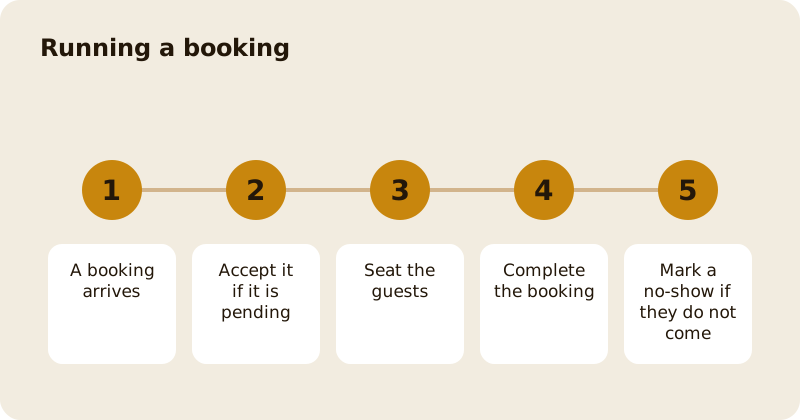
The statuses run in order: Pending, Confirmed, Seated, Completed, with Cancelled and No-show as the ends that are not completion. Seat a booking when the guests are at the table, complete it when they leave, and mark a no-show if they do not turn up. A no-show can charge a deposit or a card hold, depending on your rule. A cancellation, however late, never counts against the guest as a no-show.
You can add a booking yourself for a guest who phones or walks in, with the source noted, so your numbers show where bookings come from.
What does the Calendar show?
The same bookings laid out by day and time, so you can see where the gaps and the crushes are. Use it to check whether a Friday sitting is full, or whether a Tuesday needs a push. Closures and special hours appear on it.
What are Cancellations for?
A cancelled table two hours before service is usually a loss. The Cancellations page lists listings from the last 30 days with their status, and gives you two actions: Boost a listing to promote it, and Withdraw it. A listed table appears in the app as a last-minute table. If another guest claims it, the original deposit is refunded in full and the new guest pays theirs. If nobody claims it, your normal cancellation policy applies.
How are guests reminded?
Every plan sends a 24-hour reminder. Starter and above add a two-hour reminder, a two-week reminder and attendance confirmation, so you know who is coming. Most no-shows are forgetting, not deciding.
What does a guest see?
A confirmation, a reminder and, if you ask for one, a deposit or card hold. They can cancel, transfer the booking to a friend or offer the table to someone else, all from the app; see the diner guide to bookings.
Where do you set the rules?
Reservation settings holds your hours, party sizes, deposits and cancellation rules; see settings, deposits and plans. For the tables themselves, read tables and the floor plan. The product guide is reservations and deposits.
Questions
Common questions
What does Pending mean for a booking?
The booking is waiting for you to accept it. The guest is told when you do, and until then the table is not guaranteed. Whether bookings arrive Pending depends on your settings.
What happens when I mark a no-show?
The booking is recorded as a no-show and, depending on your rule, a deposit may be kept or a card hold charged. A late cancellation is not counted as a no-show.
Can I add a booking by phone?
Yes. Add the booking yourself with the guest's details and the source, so your numbers show where bookings come from.
What is the Cancellations page?
It lists tables that were cancelled in the last 30 days and listed as last-minute tables, with actions to Boost or Withdraw a listing. If a new guest claims a table, the original deposit is refunded.
Who can use the Reservations pages?
People with the manage reservations permission, which owners, managers and staff all have by default, so most of your team can run a service from them.
More like this
Read next
Dashboard: Account and billing, Stripe payouts and your invoices
Account and billing is where you connect Stripe, see what Mosey has charged and why, and download invoices. Your takings go to your own Stripe account, not through Mosey.
Dashboard: Analytics and Mosey picks, what the numbers mean
Analytics shows how people find your business and what they do next. Mosey picks shows where you stand on ratings. Gold is earned from ratings alone and nobody can pay for it.
Dashboard: build your menu, scan it in and declare allergens
Menu Builder is the base for everything you sell. Scan your paper menu, tidy the dishes, choose where each is sold and declare allergens once so every ticket and label carries them.
Dashboard: Catering, requests, quotes, deposits and the calendar
Catering has its own group in the sidebar. A request arrives, you build a quote, the customer accepts, and a deposit holds the date. Here is each screen in order.
Get started
Claim your business free
Free to list, no set-up fee, and Order Ahead is 1.5% commission when you start taking orders.