
How to
Dashboard: Analytics and Mosey picks, what the numbers mean
Mosey · 23 October 2026 · 3 min read

Analytics, in the sidebar, shows how people find your business and what they do once they have: views of your page, follows, bookings, orders and so on, over a date range you choose. Mosey picks shows the ratings-built lists your business is in. You need the view analytics permission, which owners and managers have by default and staff do not. Use the pages to make one decision a week, not to watch a graph.
What does the Analytics page show?
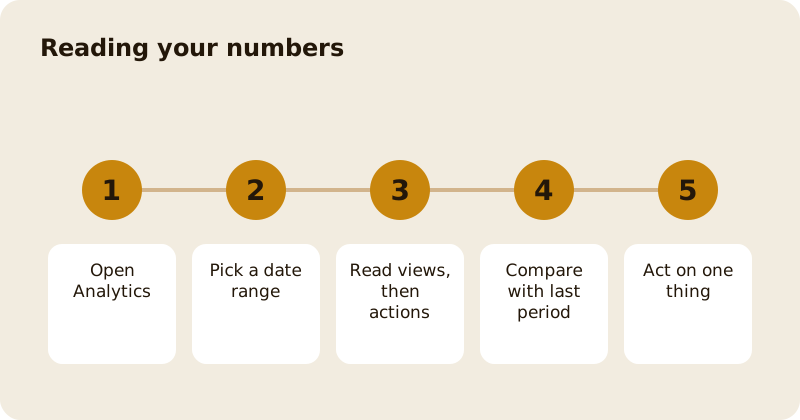
Start with views, then look at what came after them: follows, bookings, orders, vouchers and so on, for the features you have switched on. A page with plenty of views and few actions needs a better photo, clearer opening hours or a menu with prices. A page with few views needs more places to be found; see get discovered on Mosey. Compare each period with the one before it, because a number alone tells you nothing.
How are customer numbers counted?
Figures about customers count the people who have dealt with your business, not the whole of Mosey. Where a view depends on consent, only guests who agreed are included, so some groups are smaller than your door count. Treat counts as a guide to direction. The reasoning is in analytics and your customer data.
What is Mosey picks?
Mosey picks shows the lists your business appears in, such as the best of a cuisine, a meal or an occasion in your area. They are built from guest ratings of what they actually ate, and a pick only publishes when it has at least three places. Nobody can pay to be in one or to rank higher.
How does a place earn Gold?
Mosey Gold is earned from ratings alone. It rewards places that guests keep rating well over time, so the way to Gold is the way to a full room: consistent food and service, and a reply to every rating. Read how your business earns Mosey Gold for the detail, and reply to reviews for the habit that helps.
What is worth checking each week?
Check four things: views, the actions that follow, your newest ratings and any rating that needs a reply. Then change one thing, such as a photo or a lunch special, and look again after two weeks. Changing five things at once teaches you nothing.
What should you ignore?
Ignore a single bad day, a quiet week after a holiday and any number that moved by a handful of views. Small counts swing wildly, so wait for a pattern over a few weeks before you change anything big. Ignore comparisons with places that are not like yours, too: a late-night bar and a morning bakery reach different people at different hours, so judge yourself against your own last month.
Where are the other reports?
The Till has its own shift reports, Counter has Insights for loyalty, and Catering has its own analytics. Each answers a narrower question, so go there for the detail; see till shifts and reports.
Questions
Common questions
Who can see Analytics?
People with the view analytics permission, which owners and managers have by default. Staff do not, but an owner can switch it on for one person without changing their role.
Can I pay to move up in Mosey picks?
No. Picks and Gold are built from guest ratings alone. Nobody can buy a position, and the same rules apply to every place.
Why do my customer numbers look low?
Some views count only people who agreed to be contacted, and all of them count people who dealt with your business rather than everyone who walked past. Use them for direction, not for a headcount.
How often should I look?
Once a week is plenty. Compare with the previous period, change one thing, and look again after two weeks so you know what made the difference.
Where do I see till sales?
In the Till group under Reports, which holds X and Z reports for each shift. Analytics shows how people find you, while the till reports show what was sold.
More like this
Read next
Dashboard: Account and billing, Stripe payouts and your invoices
Account and billing is where you connect Stripe, see what Mosey has charged and why, and download invoices. Your takings go to your own Stripe account, not through Mosey.
Dashboard: build your menu, scan it in and declare allergens
Menu Builder is the base for everything you sell. Scan your paper menu, tidy the dishes, choose where each is sold and declare allergens once so every ticket and label carries them.
Dashboard: Catering, requests, quotes, deposits and the calendar
Catering has its own group in the sidebar. A request arrives, you build a quote, the customer accepts, and a deposit holds the date. Here is each screen in order.
Dashboard: Chain, run several places from one login
If you own or manage more than one place, one login covers them all. Chain shows the whole group at a glance, and each person still has a role per site.
Get started
Claim your business free
Free to list, no set-up fee, and Order Ahead is 1.5% commission when you start taking orders.