
How to
Dashboard: till shifts, cash counts, reports and refunds
Mosey · 23 October 2026 · 4 min read
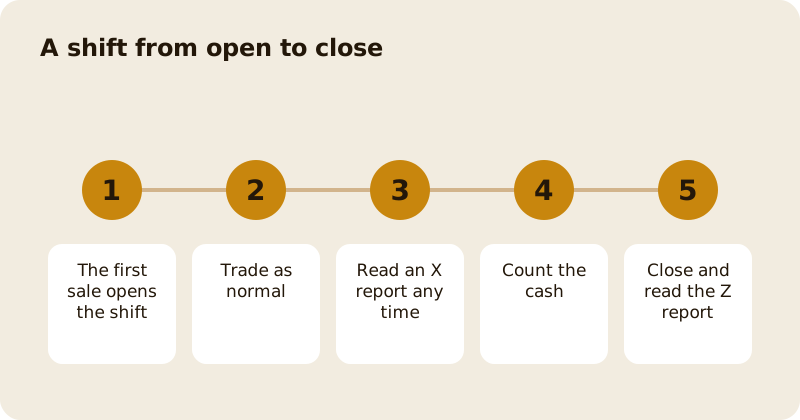
A shift is one trading period for the whole place, not for one device. It opens by itself on the first sale, collects every order, payment and drawer opening, and closes when you count the cash. The close freezes the expected cash and the variance, and the Z report is the record. Refunds are made per payment, with the owner alerted. This page covers the Till group (Orders, Reports, Settings) and the Refunds page.
When does a shift open and who can close it?
The first order opens the shift automatically, so a forgotten tap never stops service. The cost is an opening float of zero, because nobody declared one. If you want a float on the record, open the shift yourself and enter it before the first sale. A shift belongs to the place, so a flat battery on one tablet never closes it, and several devices can sell into the same shift.
Opening and closing need the manage till permission. Owners and managers have it. Staff do not until an owner grants it on the Team page, which is the first thing to sort out on a new till; see team and access roles.
What is the difference between an X and a Z report?
An X report is a reading taken while the shift is open. It changes nothing, so run one at the end of lunch if you like. A Z report is the same calculation taken at close and frozen, so tomorrow's edits cannot rewrite it. Both show sales by tender, VAT by rate, tips, refunds, voids and comps, and the cash section. The shift history page lists closed shifts so you can find an old Z report.
How does the cash count work?
Expected cash is the opening float, plus the cash taken, including any tips paid in cash, minus cash refunds. Change given is not taken off again, because the tender records the amount applied to the bill and the drawer nets the amount plus the tip. When you close, you enter what is actually in the drawer. The till stores the expected figure and the difference as the variance, so a short or over drawer is a number on the report, not a guess.
Close is blocked while a sale is waiting or parked offline on that till. Clear or move those first.
Where do you look up a day's orders?
Till then Orders lists a day's orders with each payment and how much of it has been refunded. Use it to answer a customer who says they paid twice, to find the order before you refund, or to email a receipt to the customer on the order or to an address you type.
How do you refund a payment?
Refunds are made against a payment, not against the whole order, because on a split bill you need to know which card to return. Open the order, pick the payment and enter the amount. You need the issue refunds permission, which owners and managers have by default.
A refund of the whole order puts back what the order had used: a loyalty reward, a membership perk, a voucher. A partial refund does not, because the guest still had the meal. Refunds go to the original card, the owner is alerted, and a refund that fails to save is retried safely so a guest is never paid twice. An order with money already taken cannot be voided, so refund it first. For the card side, read taking card payments without a terminal.
What should you check every night?
Close the shift, read the variance, and keep the Z report with the day's takings. Your accountant will want VAT by rate and tips kept apart from sales, and the report already does both. The wider set-up is in the Till, and what Mosey charges is on pricing.
Questions
Common questions
Who can open and close a till shift?
People with the manage till permission. Owners and managers have it by default. Staff do not, so an owner has to grant it to anyone who closes up.
Does closing a shift delete open orders?
No. An order still open stays on the closed shift and is paid on a later one. The payment lands in the period it was taken, which keeps the shift totals honest.
What does the variance on the Z report mean?
It is the cash you counted minus the cash the till expected, which is the float plus cash taken minus cash refunds. A negative number means the drawer is short.
Can staff issue refunds?
Not by default. Refunds need the issue refunds permission, which owners and managers have. An owner can grant it to a named member of staff on the Team page.
Why was my refund refused?
The most common reasons are that the amount is more than is left to refund on that payment, or that the person refunding lacks the permission. Where Mosey is open in Canada, an Interac payment is refunded in person at the reader.
More like this
Read next
Dashboard: Account and billing, Stripe payouts and your invoices
Account and billing is where you connect Stripe, see what Mosey has charged and why, and download invoices. Your takings go to your own Stripe account, not through Mosey.
Dashboard: Analytics and Mosey picks, what the numbers mean
Analytics shows how people find your business and what they do next. Mosey picks shows where you stand on ratings. Gold is earned from ratings alone and nobody can pay for it.
Dashboard: build your menu, scan it in and declare allergens
Menu Builder is the base for everything you sell. Scan your paper menu, tidy the dishes, choose where each is sold and declare allergens once so every ticket and label carries them.
Dashboard: Catering, requests, quotes, deposits and the calendar
Catering has its own group in the sidebar. A request arrives, you build a quote, the customer accepts, and a deposit holds the date. Here is each screen in order.
Get started
Claim your business free
Free to list, no set-up fee, and Order Ahead is 1.5% commission when you start taking orders.