
How to
Dashboard: Account and billing, Stripe payouts and your invoices
Mosey · 23 October 2026 · 4 min read

Account and billing, under Account in the sidebar, is where you connect your Stripe account, manage a reservations plan, read what Mosey has charged for the month and download invoices. Customers pay you directly through your own Stripe account, and Mosey takes its published fee as part of each payment. You need the manage billing permission, which is owner only by default.
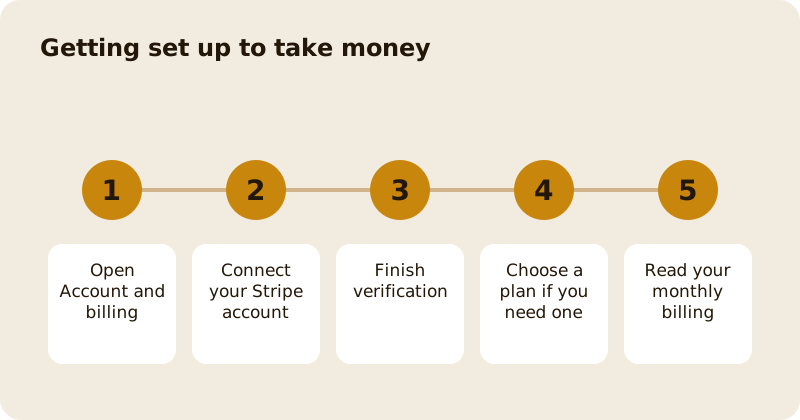
How do you connect Stripe?
What to have ready. Set aside 5 to 10 minutes and have these to hand: photo ID for the person who runs the place, the details of the bank account you want to be paid into (an IBAN in Ireland, a sort code and account number in the UK, a routing number in the US, transit and institution numbers in Canada), and your business or tax number if you have one. If you already have a Stripe account, you can connect it instead of making a new one.
Open Account and billing and start the Stripe connection. Stripe asks for the details it needs to verify a business and a bank account. Until verification is finished you can list your business, but you cannot take payments, orders, deposits, vouchers or memberships. The set-up checklist on the Overview page shows whether the payout account is verified, as in setting up your business profile.
What the stages mean. The Payouts card shows four steps: your details, Stripe checks, bank account and live. Each says who is waiting. Waiting for you means Stripe needs something from you, and one button takes you to that exact screen. Waiting for Stripe means there is nothing to do: most checks finish in minutes and some take a day. Paused means Stripe has stopped payouts until it gets what it asked for; customers cannot pay you online until it is fixed, but bookings and orders that take no payment still work. Live means customers can pay you. Only the owner can act on this card; anyone else sees the stage and who to ask.
If you leave half way, come back to the same card and press Continue with Stripe. Stripe's links only last a few minutes, so Mosey makes a fresh one each time and you carry on where you left off.
Your money is paid out by Stripe on its own schedule to the bank account you gave it. Mosey does not hold your takings.
What does Mosey charge?
Free to list. A fee applies when you sell: Order Ahead collection costs 1.5% plus VAT, delivery 6%, in-store payments 0.5% plus VAT up to €149 a month, vouchers 4.5%, events 4%, promotions 4.5% and memberships 8% of the subscription fee. Reservations are free for a basic set-up, with paid plans at €79.99 and €169.99 a month. The full rate card is on pricing, and these figures are read from the same code that charges them.
How do you read your monthly billing?
Billing lists each fee type for the month and the transactions behind it. Each fee uses the amount recorded on the order when it was placed, not today's rate, so a later change to pricing never alters a past month. A refund shows against the month it was made. If a figure looks wrong, find the order first, then ask Mosey for help with the order number.
How do you get an invoice?
Pick the month and download the invoice as a PDF. Keep it with your accounts. VAT is shown on the fees Mosey charges you, which is separate from the VAT on your own sales.
How do you change a reservations plan?
Under Reservations then Plan you can see what Free, Starter and Host include, upgrade, pause or cancel. Changes need the manage billing permission. See reservation settings, deposits and plans.
What if a payment fails or a payout is late?
Check the Stripe account first. A payment can fail because the guest's card was declined, and a payout can be held while Stripe asks for more information about the business or the bank account. Stripe emails the account holder when it needs something, so keep that address current and answer promptly. If Stripe is waiting on you, nothing in Mosey can release the money until you do. Guests are told when a card is declined, so you do not need to chase them.
Who should hold the account?
Use the legal owner's details and a business bank account, not a personal one. Stripe checks the person and the business, and a mismatch is the most common reason verification stalls. Give the person who runs the money access to Account and billing, and nobody else, because the manage billing permission is owner only for a reason.
What if you have more than one place?
Each place has its own Stripe connection and billing. Owners can compare them in the chain pages; see running several places as a chain.
Questions
Common questions
Do I have to connect Stripe to be listed?
No. Listing is free and needs no payout account. You need a verified Stripe account only when you want to take payments, such as orders, deposits, vouchers or memberships.
Does Mosey hold my money?
No. Customers pay through your own Stripe account and Stripe pays you out. Mosey takes its published fee as part of each payment rather than invoicing you later.
Who can see billing?
People with the manage billing permission, which only owners have by default. Only an owner can grant it to anyone else.
Why does a past month never change?
Billing reads the fee recorded on each order when it was placed. A later change to a rate affects new orders only, so your invoices stay as they were.
Where do I find the fee for in-store payments?
On the pricing page, and in the billing page for the month. The in-store fee is shared between the till and Mosey Pay and is capped each month.
More like this
Read next
Dashboard: Analytics and Mosey picks, what the numbers mean
Analytics shows how people find your business and what they do next. Mosey picks shows where you stand on ratings. Gold is earned from ratings alone and nobody can pay for it.
Dashboard: build your menu, scan it in and declare allergens
Menu Builder is the base for everything you sell. Scan your paper menu, tidy the dishes, choose where each is sold and declare allergens once so every ticket and label carries them.
Dashboard: Catering, requests, quotes, deposits and the calendar
Catering has its own group in the sidebar. A request arrives, you build a quote, the customer accepts, and a deposit holds the date. Here is each screen in order.
Dashboard: Chain, run several places from one login
If you own or manage more than one place, one login covers them all. Chain shows the whole group at a glance, and each person still has a role per site.
Get started
Claim your business free
Free to list, no set-up fee, and Order Ahead is 1.5% commission when you start taking orders.