
How to
Dashboard: reservation settings, deposits and plans
Mosey · 23 October 2026 · 3 min read
Reservations Settings holds the rules for bookings: the hours you take them, the party sizes, buffers between sittings, closures, deposits, cancellation rules and reminders. The Plan page shows the Free, Starter and Host tiers and what each adds. Deposits carry no Mosey commission at any tier; the reservation plan is a flat monthly price with no per-cover charge.
What can you set?
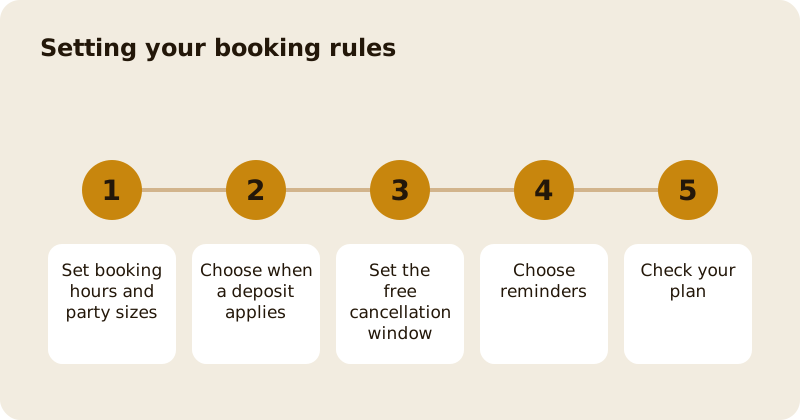
Booking hours and party sizes. The days and times you take bookings and the smallest and largest party. Parties outside your range can be sent to gatherings.
Buffers and closures. Time between sittings, and the days you are closed, with special hours for holidays.
Walk-in reserve. Covers held back from online booking so that you can seat walk-ins.
Deposits. Set a deposit per cover or per booking and choose when it applies: every booking, large parties only, peak nights only or specific slots. Deposits are part of the Starter plan and above. They pass to you in full through your own Stripe account. Hosts can also take a card hold, which only charges a guest who does not turn up.
Cancellation rules. The free cancellation window in hours, and an optional partial refund between two points. These are shown to the guest before they pay. The cancellation policy guide helps you choose.
Reminders. A 24-hour reminder on every tier; two-hour and two-week reminders and attendance confirmation from Starter.
What do the plans include?
Free covers bookings, walk-ins and the queue, manual entry, 24-hour reminders, QR check-in and source tracking, up to a monthly booking limit. Starter, at €79.99 a month, raises the limit and adds deposits, the waitlist, guest notes and allergens, party rules, buffers, closures, the cancellations page, extra reminders, attendance confirmation and calendar sync. Host, at €169.99 a month, has unlimited bookings and adds the floor plan and auto-assign, the Front of house screen, card holds, the trust score, a guest CRM and VIP tags, multi-staff with PIN protection, peak rules, dynamic overbooking and forecasting.
Every paid plan starts with a free trial, annual plans give a month free, and a downgrade never deletes what you configured. See the pricing page for the full card.
What is the trust score?
On Host, a guest with a repeated no-show pattern across the network is flagged to you and can be required to leave a deposit. The guest is never shown a count and never told a number, and a late cancellation never counts against them.
How do guests book?
In the app, from a booking link you put in your Instagram bio or Google listing, with an embeddable widget on your own website, by phone or at the door, entered by staff. A guest booking through the widget does not need a Mosey account.
How do you check your settings work?
Make a test booking as a guest, on a phone, from the link. Check the times offered, the deposit wording and the confirmation. Then change one setting and test again. The bookings page and tables page show what you see on the other side. The product guide is reservations and deposits.
Questions
Common questions
Does Mosey take a cut of reservation deposits?
No. Deposits carry no Mosey commission at any tier, and they pass to you in full through your own Stripe account. The reservation plan is a flat monthly price.
Which plan do I need for deposits?
Deposits start with the Starter plan. Card-hold deposits, where a guest is charged only on a no-show, are part of the Host plan.
What does the Free plan include?
Bookings up to a monthly limit, walk-ins and the queue, manual entry, 24-hour reminders, QR check-in and source tracking. See the pricing page for the limit.
Does downgrading delete my settings?
No. A downgrade never deletes what you configured, so your floor plan and peak rules wait for you if you come back up.
Can guests book without an account?
Yes, through the widget on your own website. They pick a time, leave a name and number, pay a deposit if you ask for one, and are booked.
More like this
Read next
Dashboard: Account and billing, Stripe payouts and your invoices
Account and billing is where you connect Stripe, see what Mosey has charged and why, and download invoices. Your takings go to your own Stripe account, not through Mosey.
Dashboard: Analytics and Mosey picks, what the numbers mean
Analytics shows how people find your business and what they do next. Mosey picks shows where you stand on ratings. Gold is earned from ratings alone and nobody can pay for it.
Dashboard: build your menu, scan it in and declare allergens
Menu Builder is the base for everything you sell. Scan your paper menu, tidy the dishes, choose where each is sold and declare allergens once so every ticket and label carries them.
Dashboard: Catering, requests, quotes, deposits and the calendar
Catering has its own group in the sidebar. A request arrives, you build a quote, the customer accepts, and a deposit holds the date. Here is each screen in order.
Get started
Claim your business free
Free to list, no set-up fee, and Order Ahead is 1.5% commission when you start taking orders.