
How to
Dashboard: Catering, requests, quotes, deposits and the calendar
Mosey · 23 October 2026 · 3 min read

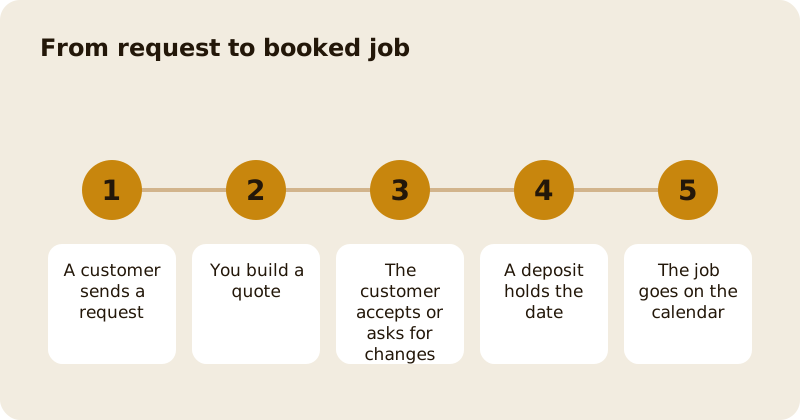
Catering is its own group in the sidebar, with Requests, Calendar, Regular orders, Companies, Catering menu, Pricing rules, Settings and Analytics. A customer sends a request from the app, you answer with a quote, they accept or ask for changes, and a deposit holds the date. Mosey takes 3% of a catering job. You need the manage catering permission, which owners and managers have by default and staff do not, because a quote sets a price.
How do you switch catering on?
Open Account, then Enable features, and switch on Catering. Mark the dishes you will cater for on your Catering menu, and say how many each serves. Then fill in Settings with your lead time, your area and your deposit, and set up payouts so the deposit can reach you. Settings tells you which of these is still missing. Once the menu and payouts are in, your business appears to customers who are looking for catering. Only list what you can do well at volume, because a customer who gets a poor tray tells everyone.
What are pricing rules?
Pricing rules are your own working sums, such as a delivery charge or a minimum order, that pre-fill your quote. They are internal by default, so a customer never sees a rule or its label. The customer sees only the lines you put on the quote. Keep rules honest, so a quote can be built in minutes at the same standard each time.
How do you answer a request?
Open Requests, read the date, numbers and any dietary needs, and build the quote from your menu and rules. Send it. The customer can accept, ask for changes or decline. A new quote replaces an unanswered one, so you never have two competing prices live. Reply quickly; a quote the same day wins more jobs than a cheaper one in three. Allergens matter here: ask for them in writing and pass them to the kitchen.
How do deposits and payment work?
Once the customer accepts, they pay the deposit through the app, and the balance is collected as you set it. All payments pass through your own Stripe account. If the customer cancels, your cancellation terms apply, and you decide any refund. State your terms in Settings so nobody is surprised. The policy side is in write a cancellation and deposit policy guests accept.
What are Regular orders and Companies?
Regular orders are repeating jobs, such as a weekly lunch for an office. Companies lists the businesses you cater for, and works with Mosey for Teams, where a company can order for staff; see win company orders with Mosey for Teams.
How do you price a job you have not done before?
Cost it from the kitchen out. Add food, labour, packaging, transport and a margin, then compare with the per head price you would be happy to say aloud. Keep a note of what each job really took, and adjust your rules when reality differs. Over a few jobs your pricing rules become the best record of what catering costs you. See food cost and gross profit explained.
How do you plan the day?
The Calendar shows booked jobs, so you can see capacity before accepting another. Check it against your rota and your kitchen. The larger picture is in private hire and large group bookings.
Questions
Common questions
Who can answer catering requests?
People with the manage catering permission, which owners and managers have by default. Staff do not, because a quote sets a price and takes a deposit.
Will customers see my internal pricing rules?
No. Pricing rules are internal by default. They pre-fill your quote, and the customer sees only the lines you put on it.
Can I send a second quote?
Yes. A new quote replaces the unanswered one, so a customer never has two competing prices, and an accepted quote that is not yet paid is replaced as well.
Who takes the payment?
The customer pays through the app into your own Stripe account. You set the deposit and the balance terms in Settings, and your cancellation terms apply if they cancel.
What does Mosey charge for catering?
A percentage of the job, shown on the pricing page, charged when the customer pays. There is no subscription for catering.
More like this
Read next
Dashboard: Account and billing, Stripe payouts and your invoices
Account and billing is where you connect Stripe, see what Mosey has charged and why, and download invoices. Your takings go to your own Stripe account, not through Mosey.
Dashboard: Analytics and Mosey picks, what the numbers mean
Analytics shows how people find your business and what they do next. Mosey picks shows where you stand on ratings. Gold is earned from ratings alone and nobody can pay for it.
Dashboard: build your menu, scan it in and declare allergens
Menu Builder is the base for everything you sell. Scan your paper menu, tidy the dishes, choose where each is sold and declare allergens once so every ticket and label carries them.
Dashboard: Chain, run several places from one login
If you own or manage more than one place, one login covers them all. Chain shows the whole group at a glance, and each person still has a role per site.
Get started
Claim your business free
Free to list, no set-up fee, and Order Ahead is 1.5% commission when you start taking orders.