
How to
Dashboard: build your menu, scan it in and declare allergens
Mosey · 23 October 2026 · 4 min read
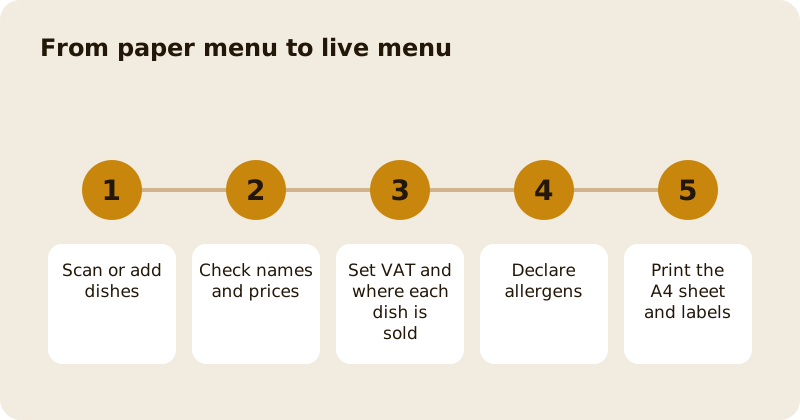
Menu Builder is where you create the menu that guests see in the app and on the website, and that your till and kitchen use. Scan a paper menu to start, then check each dish, set its price and VAT rate, choose where it is sold (eating in, Order Ahead, delivery or catering) and declare its allergens. The allergen declaration is stored once and printed on kitchen tickets and receipts, and the dashboard can produce an A4 allergen sheet and labels for food you pack yourself.
How do you start?
Open Menu Builder in the sidebar. You need the manage menu permission. You can add dishes by hand, or scan a photo of your paper menu: the scan reads the names and prices into dishes that you then check. A scan is a draft. Read every line before you publish it, because a misread price is a real price once it is live. The guide to menus and AI menu scanning explains what the scan can and cannot do.
What can you set on a dish?
The name, description, price and photo. The VAT rate, which you can set on a dish or on a whole section; a dish can have its own rate for takeaway. Sizes and extras, such as a large portion or extra cheese, and quick modifiers. Whether the dish is available for Order Ahead, delivery, the till or none. A catering item is sold in a catering unit with the number of people it serves and is kept off Order Ahead and delivery automatically.
Use sections to group dishes the way guests read them. Put your best sellers first.
How do you declare allergens?
Open a dish and set what it contains and what it may contain, add a note and, if you pack the dish yourself, the ingredients. A dish you have not declared tells guests: The place has not listed allergens for this dish. Ask them before you order. A dish declared with nothing in it says: The place lists no allergens for this dish. Mosey never says a dish is allergen free or safe; it says what you declared.
Each change to a declaration is saved with who made it and when. If you change a declaration, orders already rung keep the version the guest was shown. The old free-text allergies from earlier menus were mapped across by exact names, and anything the system could not map is kept as a note: check every dish and re-declare where needed.
What prints and where?
The declared allergens appear on the kitchen ticket, the kitchen display, the receipt and the order confirmation email, headed Allergen information from the place. The A4 allergen sheet is a matrix of dishes against allergens, produced from the dashboard as a PDF and ready for the wall. Labels for food packed on site list the ingredients with the 14 allergens in bold, and a dish with no ingredient list is not printed; it is listed so you can complete it. The native till app does not show allergen chips on its order screen yet; the web till does.
The allergen guide explains the law and the routine.
How do you copy a menu to another venue?
If you run several places, you can copy a menu across; the allergen declaration is copied too, with its own history entry. See running several venues.
What about prices?
Menu prices are what guests pay, including VAT. If a VAT rate changes, Mosey proposes the change, you confirm it, and you choose to keep the shelf price or keep what the place earns. See the VAT guide.
Which tools use the menu?
The till, Order Ahead, delivery, the kitchen display and your page in the app. A well-built menu is the cheapest improvement you can make. Read how to write a menu that sells next.
Questions
Common questions
Can I scan my paper menu?
Yes. Menu Builder can read a photo of a paper menu into dishes. Treat the result as a draft and check every name and price before you publish.
What does a dish with no allergen declaration say?
It tells guests that the place has not listed allergens for the dish and to ask before ordering. A dish declared with nothing in it says the place lists no allergens for it.
Does Mosey say a dish is allergen free?
No. Mosey shows only what you declared for each dish, and never describes a dish as allergen free or safe, so the declaration stays your responsibility.
Where do declared allergens print?
On the kitchen ticket, the kitchen display, the receipt and the order confirmation email. You can also produce an A4 allergen sheet and labels for food you pack yourself.
Who can edit the menu?
People with the manage menu permission, which owners and managers have by default. You can grant it to staff on the Team page.
More like this
Read next
Dashboard: Account and billing, Stripe payouts and your invoices
Account and billing is where you connect Stripe, see what Mosey has charged and why, and download invoices. Your takings go to your own Stripe account, not through Mosey.
Dashboard: Analytics and Mosey picks, what the numbers mean
Analytics shows how people find your business and what they do next. Mosey picks shows where you stand on ratings. Gold is earned from ratings alone and nobody can pay for it.
Dashboard: Catering, requests, quotes, deposits and the calendar
Catering has its own group in the sidebar. A request arrives, you build a quote, the customer accepts, and a deposit holds the date. Here is each screen in order.
Dashboard: Chain, run several places from one login
If you own or manage more than one place, one login covers them all. Chain shows the whole group at a glance, and each person still has a role per site.
Get started
Claim your business free
Free to list, no set-up fee, and Order Ahead is 1.5% commission when you start taking orders.