
How to
Dashboard: Chain, run several places from one login
Mosey · 23 October 2026 · 3 min read

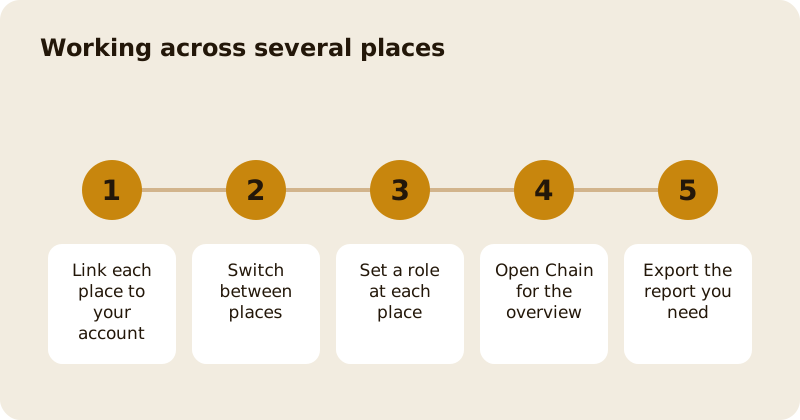
Chain, under Account in the sidebar, appears when you have more than one place on your login. It gives owners one view across the group: an overview, financials, the team across sites and in-store payments. Each person still has a role per place, so a manager at one site can be staff at another. Seeing the group needs the view chain permission and exporting figures needs manage billing, both owner only by default.
How do you add a second place?
Claim or add the place, then link it to your login. It appears in the place switcher at the top of the dashboard, and everything you do after that applies to the place you have selected. Each place has its own menu, bookings, Stripe connection and billing, because they are separate businesses in law and in tax. Check the selected name before you change a price.
What does the Chain overview show?
The Chain pages are read only views across the places you own: how each is doing side by side, so you see which site is slow before the month ends. Financials needs the manage billing permission because it shows money. The team view shows a grid of people against places and roles, which is the quickest way to see who can do what where. The same grid is explained in team and access roles.
How do roles work across places?
A role belongs to a link between one person and one place. Someone can own two sites, manage a third and work the floor at a fourth. When you add a person, choose the role per site. Owner only powers, such as billing, the team and the chain pages, cannot be granted by anyone who is not an owner. For the detail see team and access roles.
What can you export?
Owners can export orders and payments for the group as spreadsheet files. A large export is capped and says when it has been cut short, so narrow the dates and run it again. The in-store payments view also breaks takings down by member of staff, which helps when you set up tips and bonuses. Payments made before staff attribution began are not attributed to anyone.
What goes wrong when running several places?
The common failures are small. A price changed at the wrong site because the switcher was on another name. A manager who left one place and still has access to another. A menu copied across with the wrong allergens. Build three habits: read the place name before you save, review the team grid every month, and re-check allergens whenever a dish is copied. None of it takes long, and each prevents a real problem.
What should you standardise?
Keep dish names, categories and allergens consistent across menus, so reports compare like with like. Keep the same permissions for the same job at every site. Then a new manager can start at any place without a lesson in how that one differs. The money side is covered in cash flow for restaurants, and the billing pages are explained in account, billing and payouts.
Questions
Common questions
Does each place have its own billing?
Yes. Each place has its own Stripe connection, plan and monthly billing, and the Chain financials page lets an owner compare them without opening each one.
Can a manager see the whole chain?
Not by default. The chain pages need the view chain permission, which is owner only unless an owner grants it, and only an owner can grant it.
Can one person have different roles at different places?
Yes. A role belongs to one person at one place, so the same person can be owner at one site and staff at another.
Can I export all my takings?
Owners can export orders and payments for the group. Large exports are capped, and the file says if it was cut short, so narrow the dates and run it again.
Do I have to use Chain?
No. It only appears when you have more than one place, and every other tool works the same on a single site. Use as much or as little of it as you like.
More like this
Read next
Dashboard: Account and billing, Stripe payouts and your invoices
Account and billing is where you connect Stripe, see what Mosey has charged and why, and download invoices. Your takings go to your own Stripe account, not through Mosey.
Dashboard: Analytics and Mosey picks, what the numbers mean
Analytics shows how people find your business and what they do next. Mosey picks shows where you stand on ratings. Gold is earned from ratings alone and nobody can pay for it.
Dashboard: build your menu, scan it in and declare allergens
Menu Builder is the base for everything you sell. Scan your paper menu, tidy the dishes, choose where each is sold and declare allergens once so every ticket and label carries them.
Dashboard: Catering, requests, quotes, deposits and the calendar
Catering has its own group in the sidebar. A request arrives, you build a quote, the customer accepts, and a deposit holds the date. Here is each screen in order.
Get started
Claim your business free
Free to list, no set-up fee, and Order Ahead is 1.5% commission when you start taking orders.