How to
How to book a table on Mosey and manage your bookings
Mosey · 23 October 2026 · 3 min read

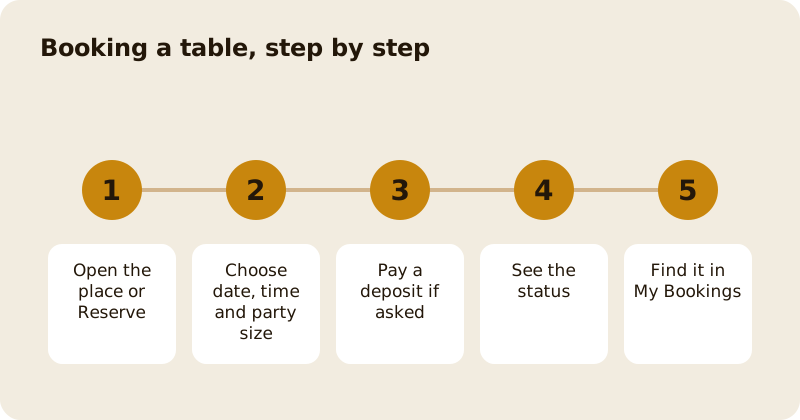
To book a table on Mosey, open a place that takes bookings and tap Book a table, or use the Reserve category on the Home screen to search for places with tables free. Choose the date, time and party size, add a deposit if the place asks for one, and confirm. Your booking appears under My Bookings in the You menu with its status, and you can cancel or change it from there.
How do you find a place that takes bookings?
There are two ways in. The first is from a place's own page: if it takes bookings, you see Book or Book a table among its actions, next to Order and Directions. If you see Closed for bookings, the place is not taking them right now.
The second is the Reserve category on the Home screen, which shows how many tables are free tonight. Reserve has three modes: Tables, which searches places with availability at your time and party size, Last-minute, which lists cancelled tables people are offering, and Gatherings, for large groups and private hire. You can filter by cuisine, price, rating and booking, search by name and use Near me and Popular.
How do you choose the time and party size?
Pick a date, a time and how many of you there are. The app shows the times the place has free. If nothing is free at your time, it says there are no places available then and suggests a different time or party size. If a place you want is full, you can ask to be alerted when a table comes up; see how to set a cancellation alert.
What happens at the deposit step?
Some places ask for a deposit or a card hold to secure the table. The app shows the amount, whether it is paid now or only held on your card, and the place's cancellation rule before you confirm. How deposits and refunds work explains the options.
What do the statuses mean?
Your booking can be Pending (the place has to accept it), Confirmed, Seated, Completed, Cancelled, Listed (you have offered the table to someone else) or No-show. A Pending booking becomes Confirmed when the place accepts it; you get a notification. A booking you do not turn up for is marked a No-show, which may cost you a deposit or a card hold, depending on the place's rule.
Where do you find your bookings?
Tap your profile picture to open the You menu and choose My Bookings. There are two views, Upcoming and Past. Each booking shows the place, date, time and party size, and the actions available: confirm you are coming, tell the place you are running late or on your way, cancel, transfer, offer the table to someone else or pay a deposit that is outstanding.
How do you cancel or change a booking?
Open the booking and choose Cancel. The app shows what happens to any deposit under the place's rule, for example a full refund up to a set number of hours before. You will see a message that the booking was cancelled. To change the time or party size, check whether the place allows an edit; otherwise cancel and book again within the free cancellation window. If you cannot go, transferring the booking to a friend or offering the table to someone else are kinder than a no-show.
What if the place has no free tables?
Join a waitlist or ask for a cancellation alert, or look at Last-minute tables. Read how to join a waitlist for a full restaurant for the walk-in version. The reservations feature page has the overview.
Questions
Common questions
How do I book a table on Mosey?
Open a place that takes bookings and tap Book a table, or use Reserve on the Home screen. Choose a date, time and party size, pay a deposit if asked, and confirm.
Where are my bookings?
Tap your profile picture to open the You menu and choose My Bookings. Upcoming and Past are separate views, and each booking shows the actions available.
What does Pending mean?
The place has to accept the booking. It becomes Confirmed when they do, and you get a notification. Until then the table is not guaranteed.
Can I cancel a booking?
Yes. Open it in My Bookings and choose Cancel. The app shows what happens to any deposit under the place's rule, and confirms when the booking is cancelled.
What if the place is fully booked?
You can ask for a cancellation alert, look at last-minute tables or join a waitlist. A place may also offer queue spots for walk-ins on the day.
More like this
Read next
How restaurant deposits and cancellation policies work in Ireland
Why places ask for a deposit, when you get it back, what a card hold means, and what to do when plans change. Restaurant deposits from the diner's side of the table.
Bank holiday weekend eating out: how to avoid disappointment
Bank holiday weekends are busy and hours change. Here is how to book, check opening times and find a table when you are caught out.
Coeliac and gluten free eating out: what to ask
Eating out gluten free depends on the kitchen's answers. Here are the questions that matter and how to read what you are told.
Easter weekend eating out: planning tips
Easter weekend means changed hours and busy rooms. Here is how to check, book and keep a backup for a family meal.