
How to
Dashboard: Order Ahead and delivery orders
Mosey · 23 October 2026 · 3 min read
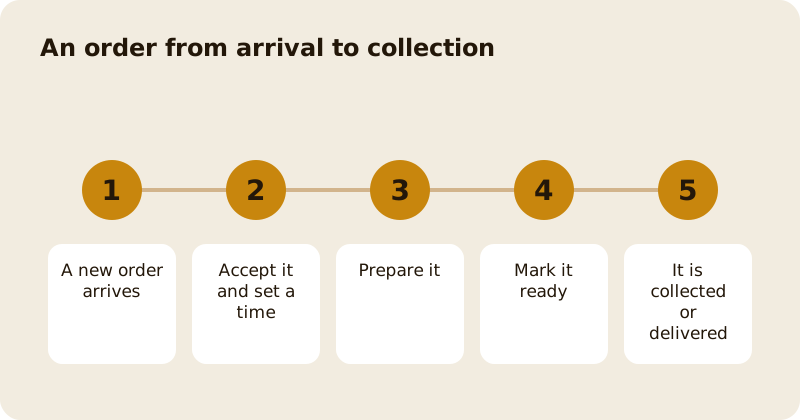
Delivery and Order Ahead in the dashboard sidebar holds your orders for collection and delivery. Orders lists new, preparing and ready orders; Kitchen Display shows them as tickets on a screen. An order arrives paid, you accept it, prepare it and mark it ready, and the guest is told at each step. Order Ahead carries a low commission and delivery a higher one, both shown on the pricing page, and the guest pays a small booking fee on top.
How do you switch Order Ahead on?
Open Account, then Enable features, and switch on Order Ahead (or pick it in the What do you want to do step on the Overview). That adds Delivery and Order Ahead to your sidebar. Then set up payouts, because customers pay by card and the service will not switch on without them, and open Settings in Delivery and Order Ahead to switch Order Ahead on. Make sure your menu has priced dishes available for Order Ahead. Set your pickup slots and how many orders you can take in each, so that a Saturday cannot stack every collection into the same quarter of an hour. You can pause ordering when you are busy. Delivery can be switched on separately, with your own drivers or with a shared driver pool; see sharing drivers with nearby venues.
What does an order look like?
An order shows the guest, the pickup or delivery time, each dish with its modifiers and notes, the allergens you declared for each, and any special requests. The allergen information shown is the version the guest saw when they ordered. A delivery order shows the address and driver notes. Check allergens and notes before you start cooking.
How do you work an order?
- Accept a new order and, where you can, confirm or set the time.
- Prepare it. If you use the kitchen display, the ticket shows on screen; otherwise print it.
- Mark it ready. The guest is notified, and a collection order shows as ready for pickup.
- Collected or delivered. The order completes, and a completed order counts as a loyalty visit for the guest.
A customer who is on their way can tell you they have arrived for curbside pickup. You will see it and can bring the order out.
What happens to the money?
The guest pays at checkout and the money goes to your own Stripe account after Mosey's commission, which is on the food and not on the booking fee. Tips left after a collection order are the staff's, not yours. A refund is made from the order; see refunds.
What if something is wrong?
If you cannot make an item, contact the guest from the order and offer a substitute or a refund. If you must cancel, cancel the order and the guest is refunded. Do not let an order sit: guests are told when it is late. Message the guest from the inbox; see the inbox.
How do you keep the kitchen sane?
Cap each slot, pause when you are slammed, and use the kitchen display with stations so that each cook sees their own dishes: stations, courses and the pass. Check your capacity against your prep. Orders that arrive faster than you can cook produce bad ratings.
What about the numbers?
Analytics shows your orders, average order value and busiest slots; see analytics. The product guides are Order Ahead and collection ordering and delivery for restaurants, and pricing lists the commissions.
Questions
Common questions
How do I switch on Order Ahead?
Open Account, then Enable features, and switch on Order Ahead to add it to your sidebar. Set up payouts, make sure dishes are available for Order Ahead, then open Settings in Delivery and Order Ahead to switch the service on. Mosey will not let you switch it on until payouts are set up, so customers never reach a payment that cannot work. Set your pickup slots and capacity too.
Who pays the booking fee?
The guest pays a small booking fee that scales with the order, on top of the food. Mosey's commission is on the food, not on the booking fee.
Can I limit how many orders I take?
Yes. Cap each pickup slot and pause ordering when the kitchen is busy. Guests see the times that are open.
What happens when I mark an order ready?
The guest is notified that their order is ready, and a collection order shows as ready for pickup. Completing the order counts as a loyalty visit for the guest.
What if I cannot make an item?
Contact the guest from the order and offer a substitute or a refund. If you cancel the order, the guest is refunded.
More like this
Read next
Dashboard: Account and billing, Stripe payouts and your invoices
Account and billing is where you connect Stripe, see what Mosey has charged and why, and download invoices. Your takings go to your own Stripe account, not through Mosey.
Dashboard: Analytics and Mosey picks, what the numbers mean
Analytics shows how people find your business and what they do next. Mosey picks shows where you stand on ratings. Gold is earned from ratings alone and nobody can pay for it.
Dashboard: build your menu, scan it in and declare allergens
Menu Builder is the base for everything you sell. Scan your paper menu, tidy the dishes, choose where each is sold and declare allergens once so every ticket and label carries them.
Dashboard: Catering, requests, quotes, deposits and the calendar
Catering has its own group in the sidebar. A request arrives, you build a quote, the customer accepts, and a deposit holds the date. Here is each screen in order.
Get started
Claim your business free
Free to list, no set-up fee, and Order Ahead is 1.5% commission when you start taking orders.