
How to
Dashboard: the Kitchen Display, stations and the pass
Mosey · 23 October 2026 · 4 min read
Kitchen Display, in the Delivery and Order Ahead group, shows orders as tickets on a screen. You create stations, route each dish to the right one, and set when a ticket turns amber and red. Cooks bump what they finish; the pass sees everything and serves a ticket only when every item is ready. A bumped ticket can be recalled for 30 minutes, and later courses on the till are held until the table is ready. You need the manage orders permission.
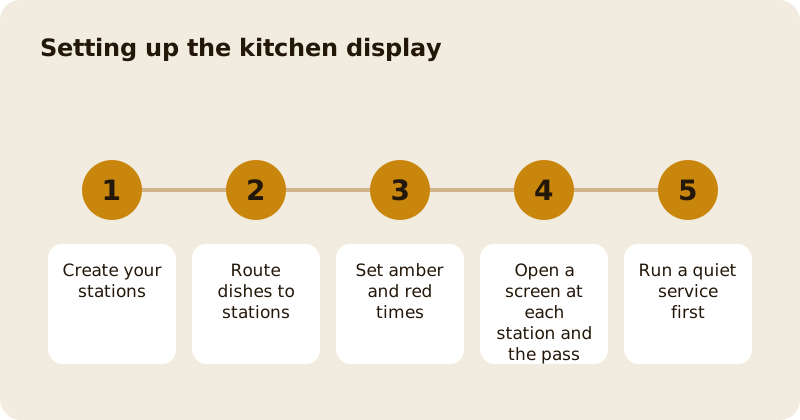
How do you create stations?
In the display's settings, add up to twelve stations with names your team already uses, such as Grill, Fry, Cold and Pastry. A station name is unique ignoring case. Then route dishes: each dish goes to a station by the dish first, and by its menu category second. A dish with no route shows on every station, so a missing route never makes food disappear.
What are the timers?
Set an amber time and a red time for your business, and optionally different ones for a station. A ticket's clock starts when the kitchen should start it: for a scheduled order it counts from the scheduled time, not from when it was placed. A ticket that is late says LATE as well as turning red. If a station's pair of times is not sensible (red must be later than amber), the screen ignores it so that a bad value cannot hide a late ticket.
How does bumping work?
A cook taps a ticket or an item when it is done. A station bump moves only that station's items. For an online order, the customer is told when the last item across all stations is ready. Every tap carries its own reference, so if the connection drops the screen keeps the tap and sends it once when it returns. The screen says Connection lost, showing tickets as of the time, and drops a tap older than ten minutes rather than replaying it onto a ticket that has moved on.
What is the pass?
The pass, or expo, is a view of every ticket with each item's station and state, readiest first. The button to serve a ticket names who is still owed, such as Waiting on Fry (2). It also shows all-day counts: how many of each dish are still to cook. Use it as the head chef's screen.
How do recall and courses work?
A bumped ticket can be recalled for 30 minutes, unless the order has been collected, delivered, cancelled or refunded. A till line that is ready can be sent back for a remake; a served till line cannot. On the web till, a line can be given a course from 1 to 4. When a bill is sent, the kitchen gets course 1 and the later courses are held on the display as cards that can only be fired. The pass or the waiter fires the next course when the table is ready. Courses are online-only and apply to till bills, not to online orders.
What do tickets show?
Allergens and modifiers first: a banner with what the dishes contain or may contain and any note from the place, then the same words under each dish, plus a count of dishes you have not listed allergens for. Extras, sizes and combo names are on lines of their own.
How do you introduce it?
Run the printer and the screen together for a quiet service, agree who bumps, and agree that nothing is bumped that is not on the plate. Mute is per device, so a wall screen and a tablet can differ. Device choices such as text size are remembered in that browser.
Read stations, courses and the pass for the thinking behind the set-up, and the kitchen display guide for the product. The orders page is Order Ahead and delivery orders, and pricing lists the costs.
Questions
Common questions
How many stations can I create?
Up to twelve per place, with names unique ignoring case. Dishes route by the dish first and by category second, and an unrouted dish shows on every station.
What does the pass show?
Every ticket with each item's station and state, readiest first, and all-day counts. It serves a ticket only when every live item is ready, and names who is still owed.
Can I recall a ticket?
Yes, for 30 minutes after it was bumped, unless the order has been collected, delivered, cancelled or refunded. A till line that is ready can be sent back for a remake.
What happens if the screen loses its connection?
It keeps showing the tickets with a note of when they were last updated, keeps your taps and sends them once when the connection returns. A tap older than ten minutes is dropped.
Do courses work on online orders?
No. Courses are for till bills on the web till. Online orders have no courses, and the native till app does not have a course choice.
More like this
Read next
Dashboard: Account and billing, Stripe payouts and your invoices
Account and billing is where you connect Stripe, see what Mosey has charged and why, and download invoices. Your takings go to your own Stripe account, not through Mosey.
Dashboard: Analytics and Mosey picks, what the numbers mean
Analytics shows how people find your business and what they do next. Mosey picks shows where you stand on ratings. Gold is earned from ratings alone and nobody can pay for it.
Dashboard: build your menu, scan it in and declare allergens
Menu Builder is the base for everything you sell. Scan your paper menu, tidy the dishes, choose where each is sold and declare allergens once so every ticket and label carries them.
Dashboard: Catering, requests, quotes, deposits and the calendar
Catering has its own group in the sidebar. A request arrives, you build a quote, the customer accepts, and a deposit holds the date. Here is each screen in order.
Get started
Claim your business free
Free to list, no set-up fee, and Order Ahead is 1.5% commission when you start taking orders.