
For businesses
Run stations, courses and the pass on a kitchen display
Mosey · 23 October 2026 · 5 min read
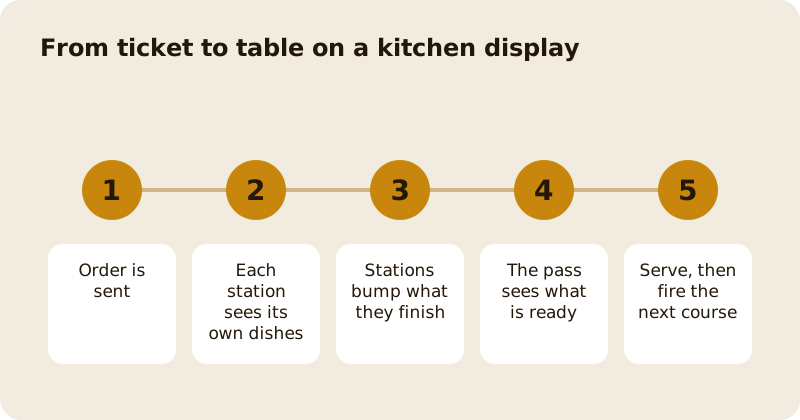
A kitchen display replaces a printer with a screen, and it earns its place when it does three jobs: it shows each station only the dishes it cooks, it lets you hold a later course until the table is ready, and it gives the pass a single view of what is ready to go. Set up your stations, route your dishes, decide your courses, and the kitchen runs on what is in front of it rather than on shouting.
What is a station, and how do dishes get to one?
A station is a part of the kitchen with its own screen: grill, fry, cold, pastry, bar. You can create up to twelve. Each dish is routed to a station by the dish first, and by its menu category second. If you have not routed a dish at all, it shows on every station, so a missing route can never make food vanish from the screens. A dish on the wrong station is a mistake you will notice at once, which is better than one you never see.
Start with a rough split and adjust after a week. Put the five dishes that cause the most confusion on the right station first. Name stations the way your team already speaks.
How do bumps work?
When a cook finishes a dish, they bump it on their screen. A station bump moves only its own items, so the grill cannot accidentally mark the salad done. The customer of an online order is still told when the last item, across all stations, is ready. A bump that is tapped twice, or replayed after a network drop, is applied once: each tap carries its own reference, so a screen that loses its connection keeps its taps and sends them when it returns.
If the connection drops, the screen keeps showing the tickets with a message such as "Connection lost, showing tickets as of 18:42:10". A tap older than ten minutes is dropped rather than replayed onto a ticket that has moved on.
How do courses work on the till?
On the web till, a pending line has a Course choice, from 1 to 4, when your business sends to a kitchen screen or printer. A bill where every line is course 1 sends exactly as before. When you send a bill with later courses, the kitchen gets course 1 and the later courses are held: the bill shows "Course 2, held", and the send button reads "Send to kitchen (course 1)". When the table is ready, a waiter sends again or the pass fires the next course, and it arrives as a ticket of its own.
Held courses show on the Kitchen Display as a held card that can only be fired, not bumped, and it never turns red. They appear only on a bill the kitchen already has food from, and only when the place uses the kitchen display. Online orders have no courses, and courses are online-only on the till: if the till is offline, choosing a course says it needs the internet. The native till app does not have a kitchen display or a course choice, so use the web till where courses matter.
What does the pass do?
The pass, or expo, is a view and not a station. It shows every ticket, with each item's station and state, the readiest first. It serves a ticket only when every live item is ready, and until then the button names what is outstanding, for example "Waiting on Fry (2)". It also shows all-day counts: how many of each dish are still to cook, with held food apart. That is how a head chef sees that eleven bowls of soup are due in the next ten minutes, before they are asked.
What about allergens and modifiers?
They come first on the ticket. A banner lists what the dishes contain or may contain and any note from the place, drawn from the allergens frozen on each order line when it was rung, with "contains" winning over "may contain". Under each dish the same words appear, and a count shows how many dishes the place has not listed allergens for, which is never read as "none". Extras, size and combo names appear on lines of their own. See the allergen guide for how to declare them.
How are late tickets shown?
Each ticket has a timer that starts when the kitchen should start it: for a scheduled order it counts from the scheduled time, not from the moment it was placed. Amber and red come from your thresholds, set per station if you want different limits for the grill and the dessert section. A late ticket says LATE as well as turning red; nothing blinks.
A bumped ticket can be recalled for 30 minutes if it was sent in error, unless the order has been collected, delivered, cancelled or refunded. A till line that is ready can be sent back for a remake.
How do you set it up in a day?
- Create your stations and route your top dishes.
- Set the amber and red times.
- Mount a screen at each station and one at the pass.
- Decide your courses: usually starters as course 1, mains as 2, dessert as 3.
- Train the team on three actions: bump, recall and fire.
- Run a quiet service with the printer still on, then switch it off.
Ask the team to agree one rule before the first busy night: nobody bumps what is not on the plate. The screen is only as honest as the people tapping it.
For the product overview, read the kitchen display guide, then the till overview, the order ahead guide and, for how long dishes really take, the prep time per dish in the display's analytics. The pricing page lists what each part costs.
Questions
Common questions
How many stations can I create?
Up to twelve per place, with names that are unique ignoring case. Each dish routes to a station by the dish first and by its category second, and an unrouted dish shows on every station.
How do I hold a second course?
On the web till, give the later lines a Course from 1 to 4 and send. Course 1 goes to the kitchen and later courses are held until the till sends again or the pass fires them.
What if the kitchen screen loses its connection?
The screen keeps showing the tickets with a note of when they were last updated, keeps your taps and sends them once when the connection returns. A tap older than ten minutes is dropped.
Can I recall a ticket that was bumped by mistake?
Yes, for 30 minutes, unless the order has been collected, delivered, cancelled or refunded. A till line that is ready can be sent back for a remake.
Does the native till app have the kitchen display and courses?
No. The kitchen display and the course choice are on the web till and dashboard. The native till app does not have them yet, so use the web till where courses matter.
More like this
Read next
How to run a supper club or tasting night that sells out
A supper club is a fixed menu, a fixed number of seats and a fixed night, sold as tickets paid in advance. Here is how to cost it, sell it and make it a habit.
How to add catering to your restaurant or café
Office lunches, platters and parties, quoted properly, with a deposit up front, the balance before the day and a prep sheet for the kitchen.
How to make a quiet Monday or Tuesday pay
First decide whether the quiet day should open at all. If it should, shrink it to the hours that trade and give it a reason to come that only exists on that day.
How to get more ratings and reviews for your restaurant, honestly
Ask, at the right moment, every customer, and make it easy. Never offer anything in return. A steady stream of honest ratings is worth more than any burst you could buy.
Get started
Claim your business free
Free to list, no set-up fee, and Order Ahead is 1.5% commission when you start taking orders.