
How to
Dashboard: Mosey Pay, take a payment from a customer's phone
Mosey · 23 October 2026 · 3 min read

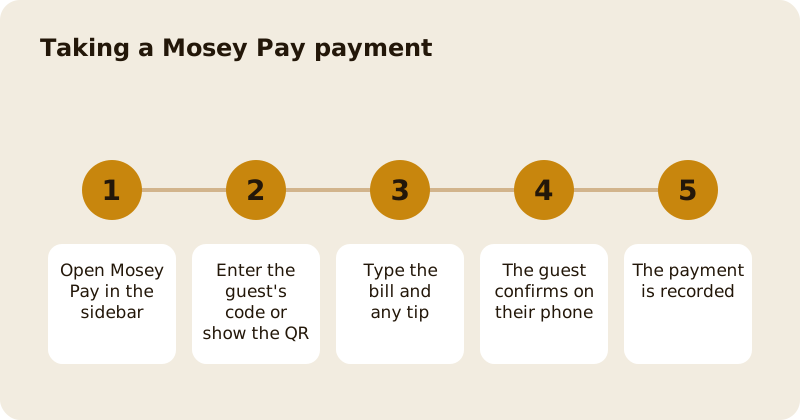
Mosey Pay takes a card payment without a terminal. The guest keeps a saved card in the Mosey app, you enter the amount, and they confirm on their phone. The money goes to your own Stripe account. Open Mosey Pay in the sidebar, which needs the take payments permission, then use either the guest's permanent code or a QR code on your screen. Mosey charges 0.5% plus VAT of the bill, capped at €149 a month before VAT, and Stripe's own processing fee is passed through whole.
How do you take a payment with a guest's code?
Every Mosey user has a permanent code in the Pay tab of the app. Ask for it, type it into Mosey Pay with the bill amount, and send. The guest's phone gets a request, and they confirm it. That is two actions for the guest.
Before the request goes, the screen shows the guest's first name and the last two digits of their card, so you can check you are charging the right person. If the code does not match anyone, or the guest has no usable card, the answer is the same message every time. That is deliberate: it stops anyone using the till to find out who is on Mosey.
How do you take a payment with a QR code?
Choose the QR option and type the amount only. The screen shows a large QR code. The guest opens the Mosey app, scans it, and confirms. The code is signed, works for five minutes and can be claimed once, so a second scan or a cancel from staff cleanly stops it. It takes three actions for the guest, so keep it for the guest who does not want to read out a code.
How do tips work?
Staff can add a tip when they enter the amount, and the guest can change the tip on the confirm screen. They cannot change the bill. Mosey takes no commission on tips, and the fee is worked out on the bill, not on the total charged. A member's discount applies to the bill too, so it never reduces what your staff receive.
Who took the payment?
Each payment is stamped with the signed-in person who entered it, so the Chain Payments report can show takings by member of staff. If you set a staff PIN, the PIN identifies who rang the sale. An older payment started by the guest rather than by staff is not attributed.
Can you refund a Mosey Pay payment?
Yes, from the dashboard, with the issue refunds permission. A refund goes back to the guest's saved card. The fee on the bill is treated the same way as a card refund, covered in account, billing and payouts.
Where does it fit with the till?
Mosey Pay and the till share one monthly cap on the in-store fee, so using both does not cost more than using one. Use Mosey Pay on its own for a counter or a market stall, and as a payment method inside the Till when you want itemised bills. The product overview is taking payments in store with Mosey Pay. If you also take card payments on your own reader, read taking card payments without a terminal, and for the permission setup see team and access roles.
Questions
Common questions
Does the guest need the Mosey app?
Yes. They need the app with a saved card. A guest without it can pay in cash or on your own card reader, and you can record that on the till as normal.
How long does a Mosey Pay request last?
A QR code works for five minutes. A request sent to a guest's phone also expires if it is not confirmed, so you can cancel it and start again without double charging.
Does Mosey take a cut of tips?
No. Mosey takes no commission on tips, and the fee is worked out on the bill rather than on the total the guest is charged, so a tip never raises it.
Who can take a Mosey Pay payment?
People with the take payments permission, which owners, managers and staff have by default. A named member of staff can have it taken away on the Team page.
Where does the money go?
To your own Stripe account, which you connect in Account and billing. Mosey does not hold your takings, and a payout account must be verified before you can take payments.
More like this
Read next
Dashboard: Account and billing, Stripe payouts and your invoices
Account and billing is where you connect Stripe, see what Mosey has charged and why, and download invoices. Your takings go to your own Stripe account, not through Mosey.
Dashboard: Analytics and Mosey picks, what the numbers mean
Analytics shows how people find your business and what they do next. Mosey picks shows where you stand on ratings. Gold is earned from ratings alone and nobody can pay for it.
Dashboard: build your menu, scan it in and declare allergens
Menu Builder is the base for everything you sell. Scan your paper menu, tidy the dishes, choose where each is sold and declare allergens once so every ticket and label carries them.
Dashboard: Catering, requests, quotes, deposits and the calendar
Catering has its own group in the sidebar. A request arrives, you build a quote, the customer accepts, and a deposit holds the date. Here is each screen in order.
Get started
Claim your business free
Free to list, no set-up fee, and Order Ahead is 1.5% commission when you start taking orders.