
How to
Dashboard: memberships, templates, the margin check and members
Mosey · 23 October 2026 · 3 min read

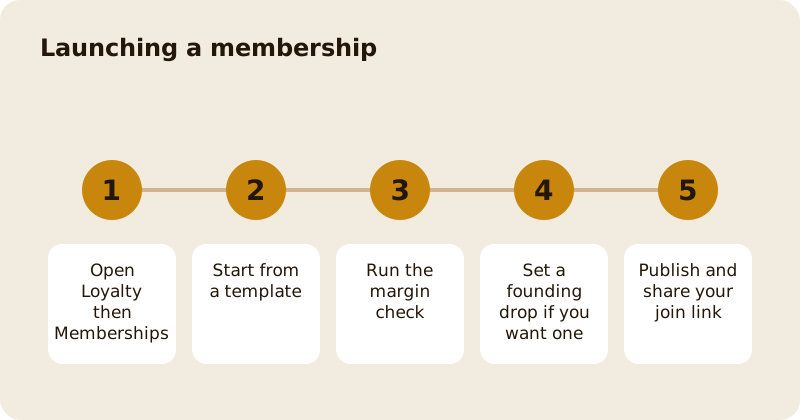
Memberships, under Loyalty in the sidebar, lets you sell a monthly or yearly subscription with perks, such as a coffee a day or a free dessert on Fridays. Members pay you through your own Stripe account, and Mosey takes 8% of the subscription fee. You need the manage memberships permission, which owners and managers have by default. The product guides explain pricing; this page walks the screens.
How do you start a membership?
Start from a template rather than a blank page. The templates are a mug club, a coffee pass, a supper club, a founding member, a credit pass and a family plan. Each pre-fills sensible perks and billing terms, and you can edit every line. Name the membership plainly and describe the perks in the order a guest cares about them.
What is the margin check?
Before a membership goes live, the dashboard tests it against a typical member: 20 visits a month with goods costing 40 per cent of what they are worth. If the perks would cost more than the fee brings in, it says so and tells you what to change. Treat a warning as a prompt to change the price or limit the perk, such as capping a free coffee at one a day. The sums are in price a membership and check the margin.
What is a founding drop?
A founding drop is a limited number of early memberships at a founding price. While a guest is checking out, their place is held for ten minutes, and when it sells out, guests can join a waiting list that notifies them once if a place opens up. Use it to fund a launch and reward your first believers; the plan is in launch a founding membership drop.
How do people join and cancel?
Each membership has a join page and a manage page on the web, so a guest can join without the app and cancel without writing to you. Share the link on your counter card, your Instagram bio and your receipts. A guest who cancels keeps the perks to the end of what they paid for. Details are in let members join and cancel online.
What can you send members?
You can send members up to four letters a month and one free push notification a month. A weekly digest keeps them posted without extra work. Anything beyond that is a paid campaign with its own gates. Only members who agreed to hear from you are included. See member letters and the weekly digest.
How do you know it is working?
The members list and the profitability card show who joined, what they used and what each is worth after perks. If a perk costs more than it earns, change it, because members rarely complain when you tighten a limit before it is used. For the deeper reading, use which members are worth it.
Questions
Common questions
What does Mosey charge on memberships?
Mosey takes a percentage of the subscription fee, shown on the pricing page, and there is no monthly subscription for the feature. You pay a fee only when a member pays you.
Can members join without the Mosey app?
Yes. Each membership has a web join page and a manage page, so a guest can join and cancel online using your link, which you can put on a card or a receipt.
What does the margin check test?
It tests the membership against a typical member who visits 20 times a month and whose goods cost 40 per cent of their value. It warns you if the perks would cost more than the fee brings in.
How many messages can I send members?
Up to four letters a month and one push notification a month are free to your business. Anything beyond that, or any reach to non-members, is a paid campaign.
Who can run memberships?
People with the manage memberships permission, which owners and managers have by default. Staff can redeem perks at the till but cannot edit the membership unless an owner grants it.
More like this
Read next
Dashboard: Account and billing, Stripe payouts and your invoices
Account and billing is where you connect Stripe, see what Mosey has charged and why, and download invoices. Your takings go to your own Stripe account, not through Mosey.
Dashboard: Analytics and Mosey picks, what the numbers mean
Analytics shows how people find your business and what they do next. Mosey picks shows where you stand on ratings. Gold is earned from ratings alone and nobody can pay for it.
Dashboard: build your menu, scan it in and declare allergens
Menu Builder is the base for everything you sell. Scan your paper menu, tidy the dishes, choose where each is sold and declare allergens once so every ticket and label carries them.
Dashboard: Catering, requests, quotes, deposits and the calendar
Catering has its own group in the sidebar. A request arrives, you build a quote, the customer accepts, and a deposit holds the date. Here is each screen in order.
Get started
Claim your business free
Free to list, no set-up fee, and Order Ahead is 1.5% commission when you start taking orders.