
For businesses
Which members are worth it? Notes, tags and the profitability card
Mosey · 23 October 2026 · 5 min read

Two tools in the Memberships area answer the questions every owner asks about members: who they are, and whether the plan pays. The Subscribers tab gives each member a private card with notes, tags, spend and visits. The Analytics tab gives each plan a profitability card that says, in one sentence and with its confidence, whether members spend more than they cost you. Both are for you and your team only; the member never sees them.
What is on a member's card?
Open a member in the Subscribers tab and you see their plan, how long they have been a member, their spend and visits, and a timeline of what they have done with you: orders, Mosey Pay and till sales, loyalty visits, bookings and perks used. You can add up to ten short tags, such as "wine club" or "allergy: nuts" or "knows the owner", and a longer private note. Tags and notes belong to your business. They are not visible to the member, they do not appear in any member-facing screen, and they are not part of a member's data export.
Use them for what your team would otherwise carry in their heads: the table they like, a name to use, a thank you owed. Keep the notes factual and kind, since they are personal data about a real person and a member can ask what you hold.
Who can see a birthday?
Only a member who chose to tell your business. A birthday is shown to a venue only where the member has agreed to share it with that venue, as month and day, never the year. If they switch that off, it disappears from your card. Do not collect birthdays any other way and then pretend they came from Mosey.
What does the member file contain?
The Subscribers tab can export a file of the members who match your filters, up to five thousand rows. It names a member only where they agreed to share their name with your business; everyone else appears as a reference with "name shared: no". No email address, phone number or username is in the file. Any cell that begins with a formula character is neutralised, so opening the file in a spreadsheet is safe. That makes it a file you can safely share with your accountant or manager.
How do you read the profitability card?
It looks at the last 90 days for each plan, and for each month group of members who joined. It counts in member-months, which means days held divided by thirty. For each plan it adds up four things:
- What members paid (the price over the days they were paying, not a trial, a gift or a pause).
- Mosey's fee on that.
- The full menu value of the perks they used (value forgone, not your cost of goods).
- Extra spend over comparable customers who are not members, using only non-member buyers as the baseline, so the comparison is not flattered.
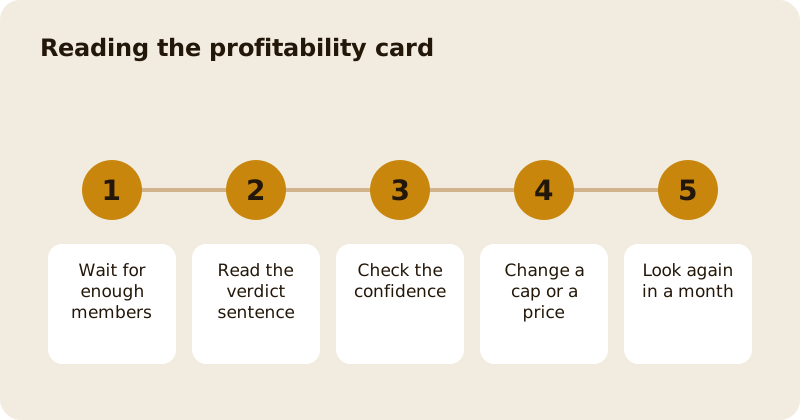
It then writes one sentence: "Members spend X more than they cost you a month", or the other way round, or "too early" if there are fewer than three member-months or fewer than five non-member buyers. It says how confident it is (low, medium or high) from the sample, and shows the numbers it used.
What are the limits of the card?
It is an estimate, not an accounting report. It measures sales, not margin, so a plan that wins extra spend on low-margin items can look better than it is. It values perks at menu price, which overstates the cost of free items and understates the cost of discounts on expensive dishes. And a small sample is noisy. Treat the sentence as a prompt to look, not a verdict.
Use it with the margin check you used when you set the plan up. If the card says members cost you more than they bring, change one thing at a time: a cap, a price, or which days a perk applies. Look again in a month.
How should you use the card in service?
Make the card part of the shift briefing, not a hidden database. Before service, the manager looks at who is booked or likely to come in: a regular whose plan is about to end, a new member on their first visit, someone tagged with an allergy. A short sentence at the start of the shift, such as "Table six is Anna's first visit as a member, say hello", does more for retention than any email. After service, add the note you wish you had had: what they drank, who they came with, what they said.
Review tags every few months and remove the stale ones. A tag that is out of date is worse than none, because your team will trust it.
What else is on the roster?
The roster can raise a flag when something unusual shows up, such as a pattern of use that looks like abuse. A flag is for you: nothing is cancelled, and the member is not told. You decide whether to dismiss it. An open payment dispute pauses a member's perks automatically while it is resolved, and the card says what happens next.
Pair the card with your member letters, the membership overview and the analytics guide, and check the pricing page for the rates.
Questions
Common questions
Can members see the notes and tags I add?
No. Tags and notes belong to your business and are read only by the people on your team with membership permission. They are not shown to the member and are not in a member's data export.
Can I see a member's birthday?
Only if they chose to share it with your business. You see the month and day, never the year, and it disappears from your card if they switch sharing off.
Does the member file include email addresses?
No. It names a member only where they agreed to share their name with your business, and it never includes email, phone or username. It covers up to five thousand rows and says if it was cut short.
How reliable is the profitability sentence?
It is an estimate over 90 days that measures sales, not margin, and says how confident it is. With fewer than three member-months or five non-member buyers it says it is too early.
What happens when a roster flag is raised?
Nothing happens to the member. The flag is for you, you can dismiss it, and the member is not told. A payment dispute pauses perks while it is open.
More like this
Read next
How to run a supper club or tasting night that sells out
A supper club is a fixed menu, a fixed number of seats and a fixed night, sold as tickets paid in advance. Here is how to cost it, sell it and make it a habit.
How to add catering to your restaurant or café
Office lunches, platters and parties, quoted properly, with a deposit up front, the balance before the day and a prep sheet for the kitchen.
How to make a quiet Monday or Tuesday pay
First decide whether the quiet day should open at all. If it should, shrink it to the hours that trade and give it a reason to come that only exists on that day.
How to get more ratings and reviews for your restaurant, honestly
Ask, at the right moment, every customer, and make it easy. Never offer anything in return. A steady stream of honest ratings is worth more than any burst you could buy.
Get started
Claim your business free
Free to list, no set-up fee, and Order Ahead is 1.5% commission when you start taking orders.