
For businesses
Let members join and cancel online with your own membership link
Mosey · 23 October 2026 · 5 min read

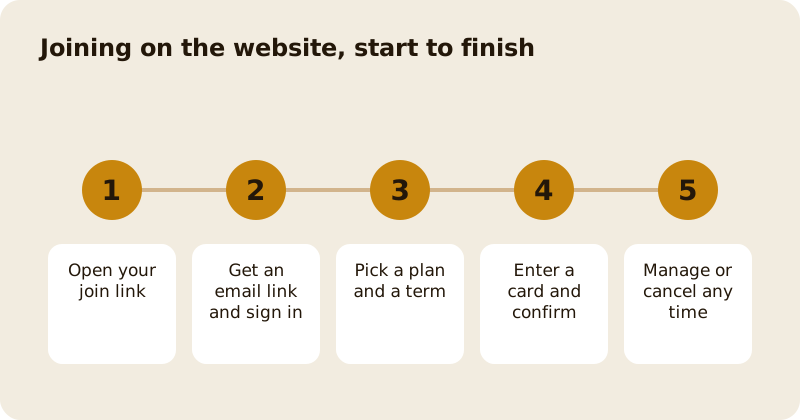
Your membership has a web address that does everything the app does. A guest opens your join link, asks for a sign-in link by email, picks a plan and a term, enters a card and joins. The same site has a manage page where a member can see their membership and cancel in one step. Put the link on your Instagram, your receipts, a poster by the till and your own website, and members no longer need to download anything first.
Where do you find the link?
In the dashboard, in the Memberships area, use "Share the join link" on a plan. The same address works for every plan at your business, and the guest sees all the plans on offer. A short poster with a QR code and the link on the table or counter turns a conversation into a sign-up in half a minute.
How does a guest join?
- The guest opens the page and chooses a plan and a billing term.
- They enter an email address. Mosey sends a one-time sign-in link. If they do not have a Mosey account, the link can create one, after they accept the terms on the page.
- The link opens a short signed session, valid for thirty minutes, for this purpose only.
- They enter card details with Stripe on your business's own payment account. The page never sees the card number.
- They tick the consent boxes the law requires in their country, which appear as separate unticked boxes, and join.
Everything that matters is the same as the app: the price, any sales tax, the consent wording, the 14-day cooling-off rule where it applies, the founding-drop gate and the seat limit. Nothing about money comes from the browser. It names a plan, a term and a confirmed card, and the server works out the rest.
Why is cancelling so easy?
Because the law increasingly requires it, and because it is the right thing to do. Rules in several places say that cancelling a subscription must be as easy as joining it. On Mosey's manage page, the Cancel button sits on the membership card, one tap opens a plain line saying what happens next, and one more tap confirms. There is no phone call, no retention offer and no required reason; the reason is optional.
Treat this as a feature. A member who can leave easily is more willing to join, and a member who leaves on good terms comes back. Do not try to build friction around it.
Who can use the manage page?
Only a verified account that holds a live membership. A request for a manage link always gets the same answer, whether or not the email has a membership, so a stranger cannot find out who is a member. A manage link never creates an account. The session lives in the page's memory only, not in browser storage, so a reload asks for a new link.
A welcome email from a website join links to the manage page, so every member knows where to go.
What if a guest has a problem?
The most common ones are a link that expired (ask for another), a card that was declined (try another, or update it later), and a plan that is full or has not opened yet (join the waiting list). A failed renewal does not end the membership at once: you choose a grace period of up to fourteen days and when the system asks Stripe to try again, and a card-expiry reminder goes to the member thirty days before their card runs out. Set these in the billing settings of the Memberships area.
For Canada and the United States, the join page carries the automatic-renewal wording that those laws require; Ireland has its own consumer rules, including the 14-day cooling-off period on a first cycle. Check what applies to your business and your plans with a solicitor.
What should the poster and the post say?
Say what members get, what it costs, and how to leave, in that order. A line such as "Join online in a minute, cancel online in a tap" is honest and sells better than hiding the exit. Put the price and the term on the poster exactly as they appear on the page, because a guest who sees a different number at the till will stop trusting the rest. If the plan has a limited number of seats, say how many are left and where to check.
For your own website, link to the join page rather than copying the plan details, so there is only one place to keep up to date.
What should you tell your team?
Give every member of staff the link and the answer to "how do I cancel?" in one sentence. If a guest asks to cancel in person, show them the manage page or cancel for them from the dashboard. Never make it a negotiation. A member who asks to leave and is helped in half a minute remembers it; a member who is argued with tells their friends.
Pair this with a good launch plan, a sensible price and the wider membership overview. The pricing page shows the rates.
Questions
Common questions
Do members need the Mosey app to join?
No. A guest can join on the website with a sign-in link sent to their email, pay by card, and manage or cancel their membership from the manage page without downloading the app.
How does a member cancel on the website?
They open the manage page from their welcome email or a fresh link, tap Cancel on the membership card, read one plain line about what happens next, and confirm. No call, no offer and no required reason.
Is the card number stored on my website?
No. Card entry uses Stripe on your business's own payment account. The page only holds a secret for that one session and never sees the card number.
What if the member's card fails at renewal?
The membership does not end at once. You set a grace period of up to fourteen days and when to retry, and a reminder goes to the member before their card expires. Set these in billing settings.
Can anyone find out who holds a membership?
No. Asking for a manage link gets the same answer whether or not the email holds a membership, and the link only works for a verified account with a live membership.
More like this
Read next
How to run a supper club or tasting night that sells out
A supper club is a fixed menu, a fixed number of seats and a fixed night, sold as tickets paid in advance. Here is how to cost it, sell it and make it a habit.
How to add catering to your restaurant or café
Office lunches, platters and parties, quoted properly, with a deposit up front, the balance before the day and a prep sheet for the kitchen.
How to make a quiet Monday or Tuesday pay
First decide whether the quiet day should open at all. If it should, shrink it to the hours that trade and give it a reason to come that only exists on that day.
How to get more ratings and reviews for your restaurant, honestly
Ask, at the right moment, every customer, and make it easy. Never offer anything in return. A steady stream of honest ratings is worth more than any burst you could buy.
Get started
Claim your business free
Free to list, no set-up fee, and Order Ahead is 1.5% commission when you start taking orders.