
How to
Dashboard: the Counter, Mosey Tap and loyalty at the till
Mosey · 23 October 2026 · 3 min read

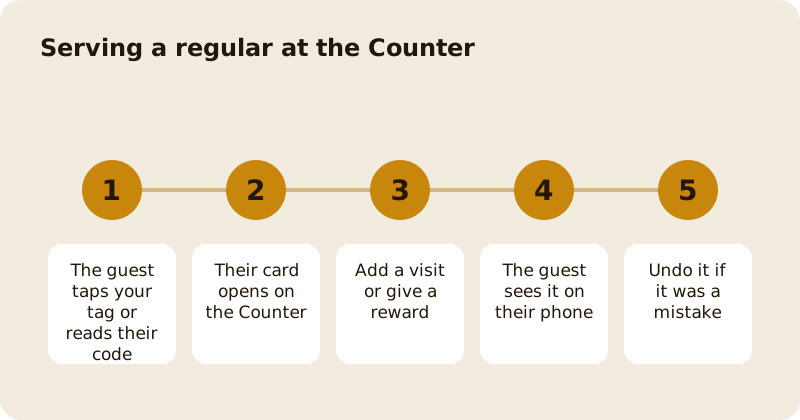
The Counter is the screen staff keep open behind the bar. A guest taps their phone on your Mosey tag, or reads out their six digit code, and their card opens with what they are owed: stamps, rewards, membership perks and anything booked for today. You press one button to add a visit or give a reward. A tap is a request, never a grant, so nothing is credited until staff confirm it. You need the serve the Counter permission, which staff have by default.
What does the guest's card show?
First name only if they set one, a masked handle, and only what concerns your business. It leads with the programme closest to a reward. It also shows what the guest asked for when they tapped, marked as asked for this: a reservation arrival, a queue place, a trail stamp, a membership perk or an event ticket check-in. Press the matching button and the Counter calls the same code the rest of the dashboard uses, so a check-in here is the same as a check-in on Bookings.
How do you add a visit or give a reward?
Press Add visit to credit a stamp or points in a programme the guest has joined. If they have not joined yet, the Counter says so and a tap never enrols anyone; they join in the app. Press the reward button when a reward is ready. A second visit on the same day is allowed, because that is how regulars behave, and repeats within 30 minutes are shown to staff rather than blocked. A reward can only be given once for a tap.
How do you undo a mistake?
Open the action and press Undo. It restores exactly what the action did, using the figures recorded when you pressed, so a programme you edited in between cannot corrupt it. A staff member can undo within 15 minutes. After that, removing an action needs the manage loyalty permission and a reason. One thing cannot be undone: marking an order as collected, because the guest has been told. The fix there is a refund, and the screen says so before you press.
What are Mosey tags?
A tag is an NFC sticker or card that opens your business in the guest's Mosey app. Manage them under Counter then Mosey tags, which needs the manage settings permission. Some can be set as a door tag for event check-in, or placed at a stop on a food trail. A guest's own tap may grant only two things, both off until you switch them on for an event or trail: self check-in at an event door, and a trail stamp, and the trail stamp needs the guest to be within 200 metres.
What are the other Counter pages?
Customers lists the people who have been served, Insights shows how many taps led to a visit and which are repeats, and Staff report shows credits by team member. The staff report flags unusual patterns against your own history, not against other places, and it flags rather than blocks.
Which guides help next?
The loyalty set-up is in run a loyalty programme, and the dashboard side is in loyalty programmes, stamps and points. Queue places and reservations that guests ask for at the Counter are covered in the walk-in queue and waitlist and bookings and the calendar.
Questions
Common questions
Does a tap give the guest a reward automatically?
No. A tap is a request and staff confirm it. The only exceptions are self check-in at an event door and a trail stamp, both off until you switch them on.
Can I add a visit twice for the same guest?
Yes. Mosey does not block a second visit, because regulars do come twice. Repeats within thirty minutes are shown to staff so you can spot a mistake.
How long can I undo an action?
Staff can undo within fifteen minutes. After that, removing an action needs the manage loyalty permission and a reason, and collected orders cannot be undone at all.
What if a guest has not joined the programme?
The Counter says they have not joined and does not add the visit. The guest joins in the app, which records their consent once for that programme.
Who can change my Mosey tags?
People with the manage settings permission, which owners and managers have by default. Anyone with the serve the Counter permission can read a tag at the Counter.
More like this
Read next
Dashboard: Account and billing, Stripe payouts and your invoices
Account and billing is where you connect Stripe, see what Mosey has charged and why, and download invoices. Your takings go to your own Stripe account, not through Mosey.
Dashboard: Analytics and Mosey picks, what the numbers mean
Analytics shows how people find your business and what they do next. Mosey picks shows where you stand on ratings. Gold is earned from ratings alone and nobody can pay for it.
Dashboard: build your menu, scan it in and declare allergens
Menu Builder is the base for everything you sell. Scan your paper menu, tidy the dishes, choose where each is sold and declare allergens once so every ticket and label carries them.
Dashboard: Catering, requests, quotes, deposits and the calendar
Catering has its own group in the sidebar. A request arrives, you build a quote, the customer accepts, and a deposit holds the date. Here is each screen in order.
Get started
Claim your business free
Free to list, no set-up fee, and Order Ahead is 1.5% commission when you start taking orders.