
How to
Dashboard: loyalty programmes, stamps, points and rewards
Mosey · 23 October 2026 · 3 min read

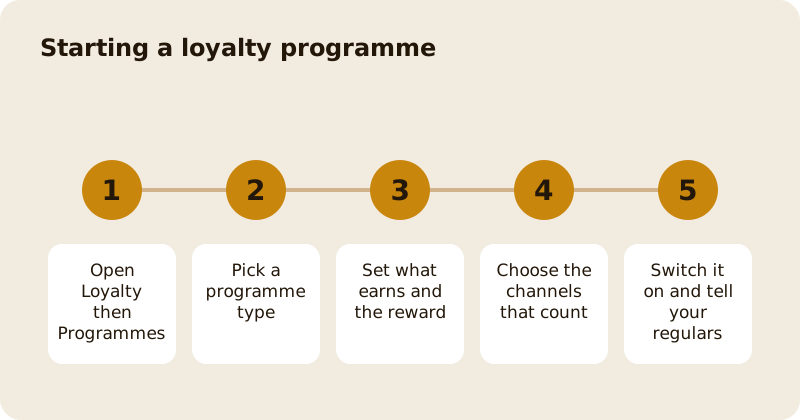
Loyalty, in the sidebar, is where you build the reward that brings regulars back. Open Programmes, choose a type, set the reward and switch it on. Guests join in the app, earn automatically on the channels you choose, and collect the reward at your till or Counter. Loyalty is free for every plan, and the one requirement is a connected Stripe account, because rewards are redeemed through payments. You need the manage loyalty permission, which owners and managers have by default.
Which programme type should you pick?
There are five. A visit programme counts visits towards a reward. A frequency programme rewards coming a set number of times in a week, month or other period. A spend band rewards what a guest spends. A tiered programme moves guests up levels. An item stamp card stamps for named dishes or whole menu sections, for example the tenth coffee. Start with one simple programme. A stamp card on your coffee is easy to explain at the till, and an easy explanation is what makes people join.
What counts towards earning?
You choose the channels. In store, Order Ahead collection, delivery, vouchers, catering, gatherings and courses each have their own switch, and promotions, events and trail stops follow their own settings. Loyalty counts the goods, not the tax. On a split bill, each person earns for their own share, not the organiser for the whole bill. A refund takes back what it earned, including a bonus from a boost.
How do boosts and birthday treats work?
A boost gives double stamps or an extra day of progress for a window you set, for example on a quiet Tuesday. A boost can be limited to in-store sales. Frequency programmes are never boosted. A birthday treat is a reward you choose, given in the week around a member's birthday. Use both sparingly, so the base reward still means something.
How do guests collect a reward?
They show it in the app and staff redeem it at the till or the Counter, or with the four digit code. The Counter adds visits and gives rewards when a guest taps your tag; see the Counter and Mosey Tap. Rewards expire as you set them, so say so on the programme.
How do you make sure the reward pays for itself?
Work out the cost of a reward as a share of what a guest spends to earn it. If ten coffees at four euros earn one free coffee costing you 80 cent in goods, the reward costs about two per cent of the spend. Check the same sum for a spend band before you set it. The method is in run a loyalty programme, and for a paid version see memberships.
What should you avoid?
Avoid three programmes at once, rewards too far away to believe, and rules that need a paragraph to explain. Tell your regulars in person for the first two weeks, and see get discovered on Mosey for how new guests find the programme. The programme is only as good as the sentence you use to sell it at the till.
Questions
Common questions
Is loyalty free to use?
Yes. Loyalty is free on every plan. The one requirement is a connected Stripe account, because rewards are redeemed through payments at your till or with Mosey Pay.
Can a guest earn on delivery orders?
Only if you switch that channel on. Each channel has its own switch, and in-store, collection, delivery, vouchers and catering are set separately so you choose what counts.
What happens to rewards if I refund an order?
A refund takes back the visit, stamps or points it earned, including any boost. A reward already used on a fully refunded order is returned to the guest.
Can I change a programme after guests have joined?
Yes, but think first. Progress already earned stays recorded as it was, so changing the rules affects what guests earn from then on, not what they already hold.
Who can create programmes?
People with the manage loyalty permission, which owners and managers have by default. Staff can serve the Counter but cannot edit programmes unless an owner grants it.
More like this
Read next
Dashboard: Account and billing, Stripe payouts and your invoices
Account and billing is where you connect Stripe, see what Mosey has charged and why, and download invoices. Your takings go to your own Stripe account, not through Mosey.
Dashboard: Analytics and Mosey picks, what the numbers mean
Analytics shows how people find your business and what they do next. Mosey picks shows where you stand on ratings. Gold is earned from ratings alone and nobody can pay for it.
Dashboard: build your menu, scan it in and declare allergens
Menu Builder is the base for everything you sell. Scan your paper menu, tidy the dishes, choose where each is sold and declare allergens once so every ticket and label carries them.
Dashboard: Catering, requests, quotes, deposits and the calendar
Catering has its own group in the sidebar. A request arrives, you build a quote, the customer accepts, and a deposit holds the date. Here is each screen in order.
Get started
Claim your business free
Free to list, no set-up fee, and Order Ahead is 1.5% commission when you start taking orders.