How to
How to pay with Mosey Pay and your Mosey Card
Mosey · 23 October 2026 · 3 min read

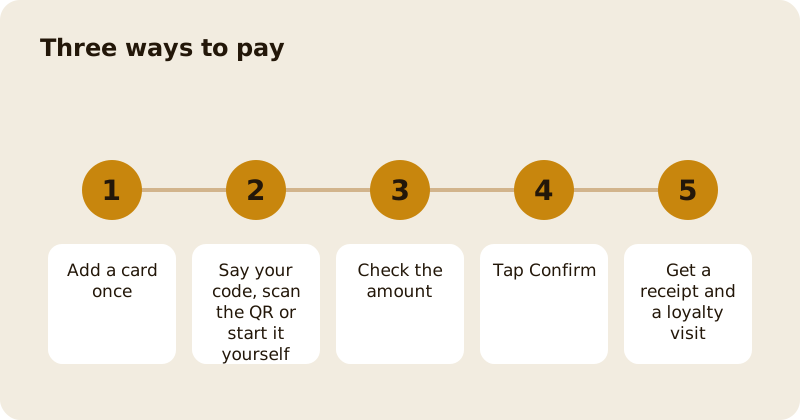
Mosey Pay lets you pay at a place from your phone with a card you have saved once. You can pay three ways: say your six-digit code to staff, scan the QR at the till, or start the payment yourself from your seat. Check the amount, tap Confirm, and you get a receipt. Every Mosey Pay payment counts as a loyalty visit, and any vouchers you hold are applied when you pay.
How do you set up?
Add a card once. From the Mosey Card screen (in Loyalty and memberships), tap Set up Mosey Card or Add your first card, and enter your card details. They are handled by Stripe, encrypted, and Mosey never stores your full card details. You can manage cards later: add another, choose a default and remove one. You will be told if your card is about to expire or has expired.
What are the three ways to pay?
Say your code. Read your six-digit code to staff. When your phone pings, tap Confirm.
Scan a till QR. Tap the scanner on the Pay screen and point at the QR at the till. You land straight on Confirm. If the QR is no longer valid, ask staff for a fresh one.
Start it yourself. On the Pay screen, find the place, from Recent, Nearby or a search, and tap it when you are ready to settle the bill from your seat.
Places that do not take Mosey Pay yet show as not set up for Mosey Pay.
What do you check before you confirm?
The place and the amount. The place enters the amount, you confirm it on your phone, and your card is charged through Stripe. If you hold a voucher for the place, it is applied, and the screen shows the balance it takes. If tipping is offered, you can add a tip before you confirm.
What do you get afterwards?
A receipt in the app, which you can find in your payment history, and a loyalty visit at places with a programme, with rewards stacking automatically. See earning and redeeming rewards.
What if the payment fails?
The app tells you: the payment did not go through, try again, or add a new card. Check that your card is current and has funds. If a payment shows twice, contact the place and Mosey support before you try again.
Can you split the bill?
Yes, where the place supports splitting by item or share. See splitting the bill on Mosey.
Is it safe?
Card details are handled by Stripe, and the place never sees them. The place sees the amount and who paid. You confirm every payment on your own phone, so nothing is charged without your tap.
Can you use it for a deposit or an order?
Bookings and orders use the same saved cards: see reservation deposits and ordering ahead. Mosey Pay is for paying at a place in person.
Related reading: paying with your phone at Cork cafes, using Mosey Tap and the rewards feature page.
Questions
Common questions
How do I pay with Mosey Pay?
Add a card once, then say your six-digit code to staff, scan the QR at the till, or start the payment yourself from the Pay screen. Check the amount and tap Confirm.
Is my card number stored by Mosey?
No. Card details are handled by Stripe, encrypted, and Mosey does not store your full card details. The place never sees them.
Does paying with Mosey Pay earn loyalty?
Yes. Every Mosey Pay payment counts as a loyalty visit at places with a programme, and rewards stack automatically.
Are my vouchers applied automatically?
Yes. Vouchers you hold for the place are applied when you pay, and the screen shows the balance they take.
What if the QR code does not work?
It may no longer be valid. Ask staff to show a fresh one, or say your code instead.
More like this
Read next
How restaurant deposits and cancellation policies work in Ireland
Why places ask for a deposit, when you get it back, what a card hold means, and what to do when plans change. Restaurant deposits from the diner's side of the table.
Bank holiday weekend eating out: how to avoid disappointment
Bank holiday weekends are busy and hours change. Here is how to book, check opening times and find a table when you are caught out.
Coeliac and gluten free eating out: what to ask
Eating out gluten free depends on the kitchen's answers. Here are the questions that matter and how to read what you are told.
Easter weekend eating out: planning tips
Easter weekend means changed hours and busy rooms. Here is how to check, book and keep a backup for a family meal.