How to
How to use Mosey Tap at the counter
Mosey · 23 October 2026 · 3 min read
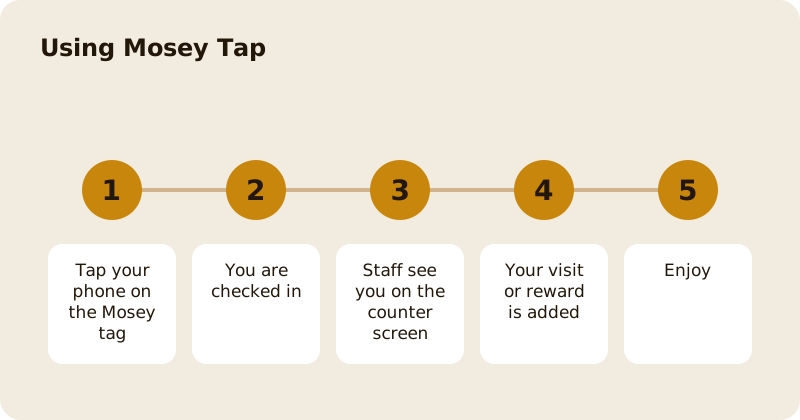
Mosey Tap is how a place recognises you at the counter. Tap your phone on the Mosey tag by the till and the app checks you in; staff at the place can then see you on their counter screen. If you cannot tap, give staff your Mosey code and they can find you. Once they can see you, they can add your visit, join you to the loyalty programme and redeem a reward.
What do you need?
The Mosey app on your phone, signed in, and a place that has Mosey tags. A tag is a small tap point near the till. Most recent phones can read it by holding the top of the phone to it. If your phone cannot, use your code.
What happens when you tap?
The app opens and shows Checking you in. When it works, you see You're on the counter screen: staff at the place can see you now, so tell them what you are having. The button Show me at the counter makes you visible if you are not yet. The screen then shows Staff can see you now.
If the tag is not working, you see one of these messages: This tag isn't in use (it may have been moved or switched off, so ask a member of staff), That didn't go through (check your connection and tap again) or Ask staff to look you up (show staff your Mosey code and they can find you).
What if you cannot tap?
Tap Can't tap? Say this code. Your Mosey code is shown on screen, six digits, and you read it to staff, who find you on their screen. It also works when you pay with Mosey Pay: see paying with Mosey Pay.
What can you do at the counter?
Join the programme. The screen shows Rewards here, with the place's loyalty programme. Tap Join and the app confirms that you are in and that your visits count from now. If the place has no programme yet, it says so.
Get a visit added. When staff add a visit, you see Visit added.
Redeem a reward. If you have a reward ready, the screen shows Ready to redeem and asks you to ask staff to redeem it for you. When it works you see Enjoy and a message that the item is on the house because you earned it.
See what you are here for. If you have a table booked, a place in the queue or an order, the screen shows it under What you're here for, such as Table for four at 7:30, Number 3 in the queue, or Your order. Staff can see the same.
Is it safe?
Staff see your display name and what you are there for, and what you choose to share. They do not see your payment card details. You only appear on the counter screen when you tap or show your code, and you can leave at any time.
What if the place does not have a tag?
Use your code, or pay with Mosey Pay, which counts as a visit. Ask the place whether it will get one. Places set up tags in their dashboard.
Why use it?
It saves you saying your name and number, and it means a visit is not forgotten. It is also how a place can see that a regular has arrived and say hello properly. It works best with a loyalty programme; see earning and redeeming rewards.
Related reading: the rewards feature page, paying with your phone and using a voucher.
Questions
Common questions
What is Mosey Tap?
A way for a place to recognise you at the counter. Tap your phone on the Mosey tag by the till, or give staff your code, and they can see you, add your visit and redeem your reward.
What if my phone cannot read the tag?
Tap Can't tap and read your Mosey code to staff. They find you on their screen and can do the same things.
What do staff see when I tap?
Your display name and what you are there for, such as a booking, a queue place or an order. They do not see your card details.
What does This tag isn't in use mean?
The tag may have been moved or switched off. Ask a member of staff, or give them your code.
Can I join a loyalty programme with a tap?
Yes. The screen shows Rewards here and a Join button. Tap Join and your visits count from then on.
More like this
Read next
How restaurant deposits and cancellation policies work in Ireland
Why places ask for a deposit, when you get it back, what a card hold means, and what to do when plans change. Restaurant deposits from the diner's side of the table.
Bank holiday weekend eating out: how to avoid disappointment
Bank holiday weekends are busy and hours change. Here is how to book, check opening times and find a table when you are caught out.
Coeliac and gluten free eating out: what to ask
Eating out gluten free depends on the kitchen's answers. Here are the questions that matter and how to read what you are told.
Easter weekend eating out: planning tips
Easter weekend means changed hours and busy rooms. Here is how to check, book and keep a backup for a family meal.