How to
How to order ahead or get delivery on Mosey
Mosey · 23 October 2026 · 4 min read

To order ahead on Mosey, open the Order tab, choose Order Ahead for pickup or Delivery, pick a place and fill your cart. Add a note for any dish, choose a pickup time or a delivery address, pay with your card in the app and follow the order's progress. For pickup, you can tell the place you have arrived. The cart shows allergens for every dish, so check them before you pay.
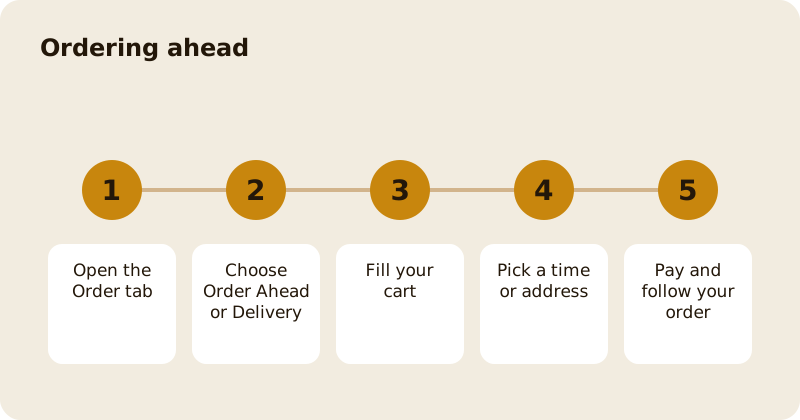
Where do you start?
Tap Order in the bottom bar. The screen explains it: choose from the menu, pay in the app and see when your order's ready. Switch between Order Ahead and Delivery at the top. Turn on location, or enter a city or area, so that Mosey can show places near you. If no places are taking Order Ahead nearby, the screen says so; try again later or widen the area.
You can search, filter and sort. The filters include price, cuisine, rating, delivery fee, minimum order, meal time, Open now, Ready in and delivery time. If you order often, Order again shows past orders to repeat, and Saved for later shows a cart you left. The Voice button lets you order by speaking, at places that offer it.
How do you fill the cart?
Open a place's menu, choose dishes and add them. Each dish shows its price and, where the place has declared them, its allergens: Contains, May contain or a note from the place. If the place has not listed allergens for a dish, the app says: The place has not listed allergens for this dish. Ask them before you order. Take that seriously if you or someone you feed has an allergy.
To add a special request, tap Add note on the item and write something like no onions or dressing on the side. The place sees it with the order.
A cart is for one place at a time. If you try to add from a different place, or switch between Order Ahead and Delivery, the app warns you that switching empties your cart, and asks you to Keep cart or Switch.
How do you pick a time or an address?
For Order Ahead, pick a pickup time: the app will not let you check out until you do. For Delivery, add your delivery address with the street, city and Eircode or postcode, and a phone number, and any notes for the driver, such as a buzzer code. The driver sees the driver notes; the kitchen does not. You can save addresses and choose a default.
A cart does not last for ever: it shows how long you have left before it expires. If it expires, refresh to start again.
How do you pay?
Check the summary: the subtotal, any delivery fee, any savings and the total. A small booking fee that scales with the size of the order is added at checkout and shown before you pay. Pay with your saved card; Stripe handles the card details. You get a confirmation and can follow the order's status.
What about curbside pickup?
Some places offer curbside pickup. The order screen asks how you are arriving, by car, on foot or by bike, and for a note such as the colour of your car. When you arrive, tap I'm here, and the place brings your order out. Keep the screen open while you travel so the place can see how far away you are, if you have shared your location.
What if something is wrong?
Message the place from the order, or contact support. If an item is unavailable, the place may substitute or refund it. Refunds follow the place's policy and Mosey's rules. See the orders feature page.
Can you order with friends?
Yes. See ordering together with a group cart. You can also split the bill when you pay at a place: splitting the bill on Mosey.
Related reading: ordering ahead and skipping the queue in Dublin and ordering collection and delivery in Galway.
Questions
Common questions
How do I order ahead on Mosey?
Open the Order tab, choose Order Ahead, pick a place, fill your cart, choose a pickup time and pay with your card. You can follow the order's status in the app.
Can I add allergies to an order?
You can add a note to any dish. The app also shows the allergens the place has declared for each dish. If a dish has no declaration it says so, and you should ask the place before you order.
Why was my cart emptied?
A cart is for one place and one order type at a time. Switching between Order Ahead and Delivery, or adding from another place, asks you to confirm and then empties it.
How does curbside pickup work?
Tell the app how you are arriving and add a note about your car, then tap I'm here when you arrive. The place brings your order out.
Is there a fee for ordering?
A small booking fee that scales with the size of the order is added at checkout and shown before you pay. Delivery has its own fee, also shown in the cart.
More like this
Read next
How restaurant deposits and cancellation policies work in Ireland
Why places ask for a deposit, when you get it back, what a card hold means, and what to do when plans change. Restaurant deposits from the diner's side of the table.
Bank holiday weekend eating out: how to avoid disappointment
Bank holiday weekends are busy and hours change. Here is how to book, check opening times and find a table when you are caught out.
Coeliac and gluten free eating out: what to ask
Eating out gluten free depends on the kitchen's answers. Here are the questions that matter and how to read what you are told.
Easter weekend eating out: planning tips
Easter weekend means changed hours and busy rooms. Here is how to check, book and keep a backup for a family meal.