How to
How to order together with a group cart
Mosey · 23 October 2026 · 3 min read

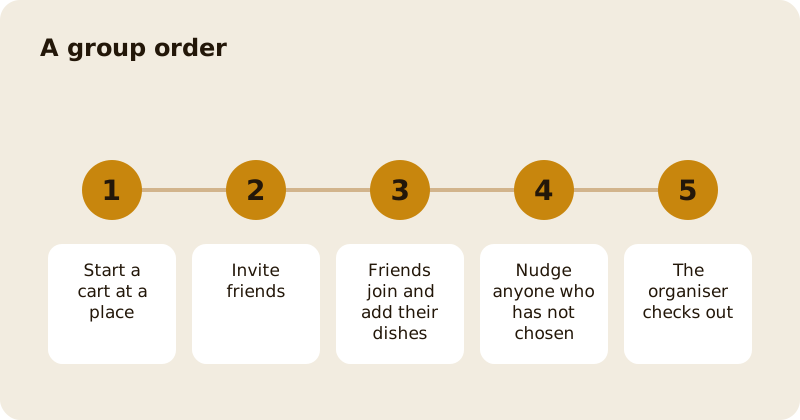
A group cart lets you order with friends or colleagues from one place. Start a cart, invite people from Mosey, and each of them joins and adds their own dishes. You can see who has chosen, nudge anyone who has not and, if you need to, hand the organiser role to someone else. The organiser checks out and pays, so the order arrives as one.
How do you start one?
Open the Order tab, pick a place and add your own dishes to a cart. Then invite people to the cart. The invite goes to friends you choose, and shows a message: the organiser has added you to an order at the place. Tap Join cart to add your dishes. The organiser sees a message, "Joined [name]'s cart", when you do.
What do the guests see?
An invitation that says who is organising and at which place, with the line "Tap join to add your bits to the cart. The organiser is already in there picking things out." After joining, they see the cart with everyone's items, and a message: You're in. Add what you fancy.
How do you manage the group?
As the organiser you can invite more people, remove someone from the cart, nudge a friend who has not added anything yet and change the organiser if someone else should pay. The app confirms each action: invited, removed from the cart, nudge sent, organiser changed.
How does payment work?
One person checks out and pays for the whole cart. The organiser chooses a pickup time or a delivery address, adds notes and pays, as in ordering ahead or getting delivery. Settle up with your friends afterwards; Mosey does not move money between friends for an order. For paying at a place, you can split the bill; see splitting the bill on Mosey.
What if a friend adds something that is not available?
The cart shows items that are unavailable, and the organiser can remove them before checkout. Each person's notes and allergy information stay with their dishes, so the kitchen knows which dish has which note.
What if the organiser disappears?
Change the organiser to someone who is there, or start a new cart. A cart expires after a while, so agree a time to order and keep an eye on the countdown.
What about allergies in a group?
Every dish in the cart shows the allergens the place has declared. Ask each person to check their own dishes and add a note. If a dish has no declaration, ask the place before you order.
Can you save a cart for later?
Yes. A cart you leave can be saved for later, and appears as Saved for later in the Order tab so you can resume it. Check that the items and prices are still right when you do.
Related reading: ordering together as a group, organising the office lunch order in Dublin and the orders feature page.
Questions
Common questions
How do I start a group order?
Add dishes to a cart at a place, then invite friends. Each friend taps Join cart and adds their own dishes. The organiser checks out and pays for the whole cart.
Who pays for a group order?
One person, the organiser, pays for the whole cart at checkout. Settle up with your friends afterwards, since Mosey does not move money between friends for an order.
Can I change who organises the order?
Yes. The organiser can hand the role to another member of the cart, and the app confirms that the organiser was changed.
Can I nudge a friend who has not added anything?
Yes. The organiser can send a nudge to a friend in the cart who has not added their dishes, and the app confirms that the nudge was sent.
What happens if the cart expires?
A cart lasts for a limited time and the countdown is shown. If it expires, refresh to start again, or save the cart for later.
More like this
Read next
How restaurant deposits and cancellation policies work in Ireland
Why places ask for a deposit, when you get it back, what a card hold means, and what to do when plans change. Restaurant deposits from the diner's side of the table.
Bank holiday weekend eating out: how to avoid disappointment
Bank holiday weekends are busy and hours change. Here is how to book, check opening times and find a table when you are caught out.
Coeliac and gluten free eating out: what to ask
Eating out gluten free depends on the kitchen's answers. Here are the questions that matter and how to read what you are told.
Easter weekend eating out: planning tips
Easter weekend means changed hours and busy rooms. Here is how to check, book and keep a backup for a family meal.