How to
How to split a booking deposit with friends on Mosey
Mosey · 23 October 2026 · 3 min read
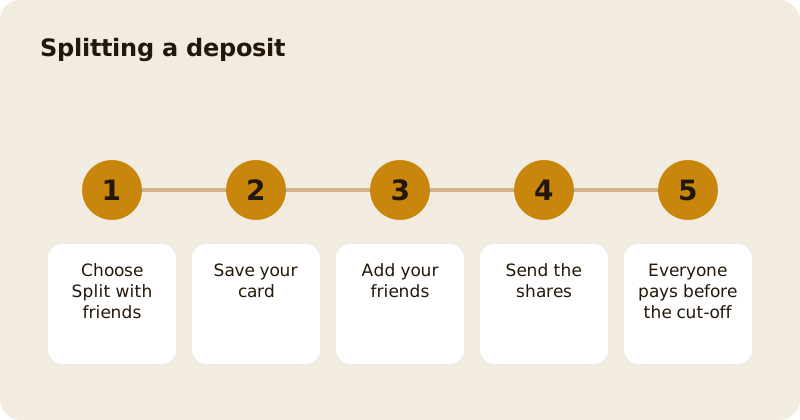
On a booking that needs a deposit, you can split the deposit with friends. Choose Split with friends on the deposit screen, save your card, add the friends from Mosey who are coming and send each one their share. Each friend gets a message with their share and pays it in the app. If a friend has not paid 12 hours before the booking, their share is charged to your card so that the place is paid, and your booking is locked in.
Where do you find the split option?
On the deposit screen, which is headed Deposit required, there is a Split with friends option beside the pay button. It shows the total deposit at the place and the number of guests. Tap it to start.
How do you set up a split?
- Save your card. The first step is titled Split with friends, and asks you to save your card with the button Save my card. This is the safety net: it is what pays any share that is not paid by friends in time. Card details are handled by Stripe, and Mosey does not store them.
- Add your friends. The next step is titled Add your friends. Search Mosey friends by name or username, and add the people who are coming. The screen shows the maths, for example the total divided by the number of people, and about how much each one pays.
- Send the shares. The button reads Send shares, with the number of shares. Each friend is messaged with their share, and you see a message that your friends have been messaged.
You need to add at least one friend to continue.
What do your friends see?
A message with the place, the booking and the amount of their share, with a button to pay. They can pay straight away. The booking shows how many shares have been paid, for example "2 of 4 paid", and how much has been collected out of the total.
What happens if a friend does not pay?
The screen states the rule: if a friend does not pay 12 hours before the booking, their share is charged to your card, so the place is paid. When the shares are settled, you see the message that the deposit is settled and the booking is locked in. If you cancel the split, the screen says so, and any shares already paid are handled under the place's cancellation rule.
Can you pay your own share the same way?
Yes. Your share shows as Your share is due until you pay it, and then as Your share is paid. Tap the amount to pay.
What if the split fails to start?
The app tells you if it could not load the payment form, set up your card or start the split, and asks you to try again. Check your connection and a card that is not expired.
Can you use a voucher as well?
Yes. A voucher can be applied to the deposit before it is split; see reservation deposits and refunds.
Related reading: splitting a group booking deposit with friends, booking a table and the reservations feature page.
Questions
Common questions
How do I split a booking deposit?
On the deposit screen choose Split with friends, save your card, add friends from Mosey, and send the shares. Each friend receives a message with their share and pays it in the app.
Why do I have to save my card?
It is the safety net. If a friend has not paid 12 hours before the booking, their share is charged to your card so that the place is paid.
Can I split with someone who is not on Mosey?
The screen searches Mosey friends by name or username, so friends need a Mosey account. Ask them to join first, or pay their share yourself.
Can I see who has paid?
Yes. The booking shows how many shares have been paid and how much has been collected out of the total deposit.
Is my card stored by Mosey?
No. Card details are handled by Stripe and Mosey does not store them, and the card you save for the split is used only if a friend does not pay their share in time.
More like this
Read next
How restaurant deposits and cancellation policies work in Ireland
Why places ask for a deposit, when you get it back, what a card hold means, and what to do when plans change. Restaurant deposits from the diner's side of the table.
Bank holiday weekend eating out: how to avoid disappointment
Bank holiday weekends are busy and hours change. Here is how to book, check opening times and find a table when you are caught out.
Coeliac and gluten free eating out: what to ask
Eating out gluten free depends on the kitchen's answers. Here are the questions that matter and how to read what you are told.
Easter weekend eating out: planning tips
Easter weekend means changed hours and busy rooms. Here is how to check, book and keep a backup for a family meal.