How to
How to pause, cancel or resume a membership
Mosey · 23 October 2026 · 3 min read

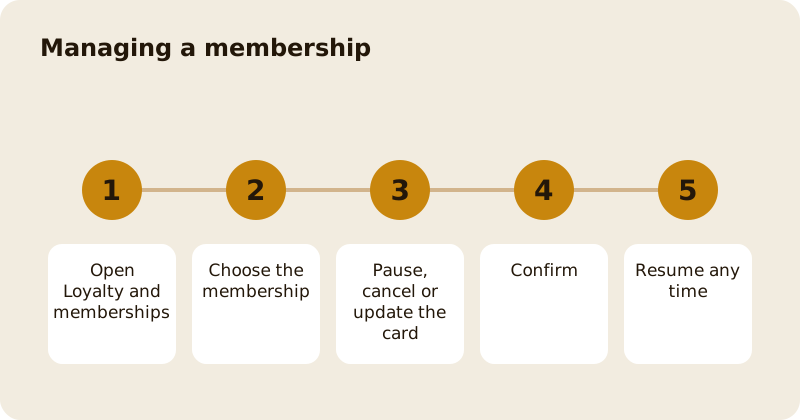
To pause, cancel or resume a membership on Mosey, open Loyalty and memberships from the You menu, choose the membership and tap Manage. Pause stops billing for one month, three months, six months or until you resume. Cancel ends it at the end of the period you have paid for, and your benefits stay live until then. Resume restarts it with one tap. You can also update the card that pays for it.
How do you pause?
Choose Pause on the membership. The screen is titled Pause membership, and says that billing stops while you are paused and that you can resume any time. Choose how long: Pause for 1 month, 3 months, 6 months, or Pause until I resume. If you choose a date, it shows Auto-resumes on that date, and you can resume earlier from the same screen. If you choose until I resume, there is no auto-resume, and billing only restarts when you tap Resume. Tap Pause to confirm, or Not now to leave it as it is.
While paused, the membership shows Paused with the date it resumes. You do not pay, and you do not use the benefits.
How do you cancel?
Choose Manage and then Cancel membership. The app asks what is making you cancel, with reasons such as Too expensive, Not using it enough, It's missing something I want, Switching to another place, I've moved away, needing a break, Had a bad experience or Other. You can add a note to help the place improve. The place may show an offer to keep you, such as a pause, a month on the house or a lower price for a cycle; you can accept it or choose Cancel anyway.
The screen reassures you that, either way, your benefits stay live until the end of the period. You see a message such as Cancelling at end of period with the date. The membership then shows Cancelled on that date. You can cancel on the website too, from the manage page linked in your welcome email, in one step.
How do you resume?
Open the membership and tap Resume. If you paused, billing restarts; if you cancelled and the period has not ended, the cancellation is reverted and the app says so. If the period has ended, you can join again from the place's page.
What if your payment fails?
The membership shows Payment failed. Tap Update payment method and choose another card. The app confirms that the card is updated and will be used from now on. A failed payment does not end the membership at once: the place sets a grace period and Mosey retries. Update your card quickly to keep your benefits. You also get a reminder before your card expires.
What about a shared membership?
If someone has added you to their membership, you can choose Leave this membership at any time. The app asks you to confirm: you will stop sharing the plan, and the owner will be told and can add you back.
What about the 14-day right?
For a first cycle you may be able to withdraw and get a full refund, with the date shown on the membership. After that, a cancellation takes effect at the end of the period.
Where can you see what you paid?
The membership shows when it renews and the price. Receipts show the tax line. Your payment history is in the You menu.
Related reading: joining a membership, finding memberships near you, letters and the weekly places digest and the rewards feature page.
Questions
Common questions
How do I pause my membership?
Open the membership, tap Manage and choose Pause, then pick one month, three months, six months or until you resume. Billing stops while you are paused.
What happens to my benefits if I cancel?
They stay live until the end of the period you have paid for. The membership then shows Cancelled on that date.
Can I undo a cancellation?
Yes, if the period has not ended. Tap Resume and the cancellation is reverted. If the period has ended, join again from the place's page.
How do I update my card?
If a payment fails, tap Update payment method and choose another card. The app confirms the card is updated and will be used from now on.
Do I have to give a reason to cancel?
The app asks for one and offers a note, but the reason helps the place improve. Choosing Cancel anyway ends the membership at the end of the period.
More like this
Read next
How restaurant deposits and cancellation policies work in Ireland
Why places ask for a deposit, when you get it back, what a card hold means, and what to do when plans change. Restaurant deposits from the diner's side of the table.
Bank holiday weekend eating out: how to avoid disappointment
Bank holiday weekends are busy and hours change. Here is how to book, check opening times and find a table when you are caught out.
Coeliac and gluten free eating out: what to ask
Eating out gluten free depends on the kitchen's answers. Here are the questions that matter and how to read what you are told.
Easter weekend eating out: planning tips
Easter weekend means changed hours and busy rooms. Here is how to check, book and keep a backup for a family meal.