How to
How to join a place's membership on Mosey
Mosey · 23 October 2026 · 4 min read

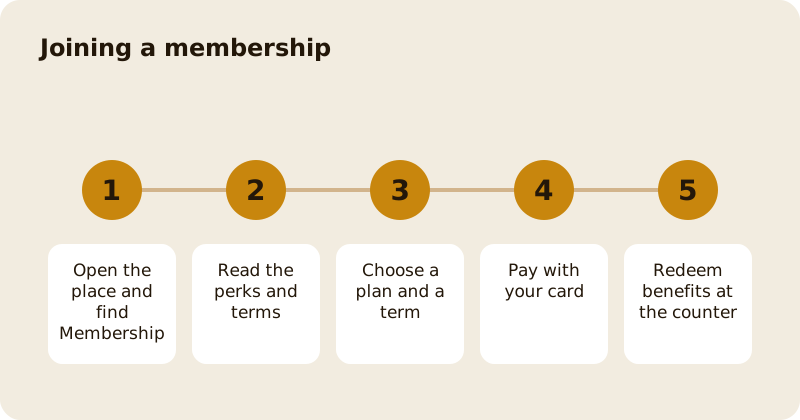
To join a membership on Mosey, open the place's page, find its membership plan, read the perks and the restrictions and terms, choose a plan and a billing term, and pay with your card. Your membership then appears under Loyalty and memberships in the You menu, with your benefits, your renewal date and what is left of each perk this month. You redeem benefits at the counter, and you can pause or cancel any time.
Where do you find a membership?
On a place's page, look for its membership. Some places have several plans, such as a coffee pass, a supper club or a family plan. A plan shows the price per month, any free trial, and the perks. You can also look at Memberships near you from the Loyalty page; see finding memberships near you.
What should you read before joining?
The perks and the Restrictions and terms. Perks can have limits: a quota such as eight uses a month, a cap per visit, or days and times when they apply. The perk list shows what is left, for example "3 of 8 left this month". The terms explain anything else, such as what happens to credit that you do not spend. If a plan has a free trial, the screen shows when it ends and the price after it.
How do you choose a term?
Some plans can be paid monthly, quarterly or yearly. A longer term may cost less per month. The screen shows each option and what you would pay. A longer term is paid in advance; ask what happens if you cancel part way, which the plan's terms explain.
How do you pay?
Pay with a card saved in the app. Card details are handled by Stripe. When you join, you get a receipt, and your card is charged on the renewal date shown. If a payment fails, the membership shows Payment failed and the app asks you to update your payment method to keep your benefits.
Can you change your mind?
Yes. For a first cycle you have a right to withdraw within 14 days where the law gives it, and the membership shows Withdraw and get a full refund, with the date by which you can do it. Ask the place if you are not sure. After that you can cancel at any time; see pausing, cancelling or resuming a membership.
How do you redeem a benefit?
At the counter. Open your membership, tap Redeem on the benefit you want, and show staff the screen. A free coffee shows as redeemed with its value. Discounts apply when you pay, and may take effect at the till or in the app. If a benefit has run out for the month, the screen tells you.
What about families and sharing?
Some plans are for a household. If you are the owner, tap Manage members to add someone by email, within the number of places on the plan, and remove them later. If you are added to someone else's membership, it shows as Shared by their name, and you can choose Leave this membership at any time; the owner is told and can add you back.
What about referrals, gifts and letters?
Refer a friend lets you share a plan. A gifted membership shows A gift from a friend, with the date it ends. Companies can also give staff memberships through Mosey for Teams, which appear in your gifts. Members can receive letters and a weekly summary of their places in the app, if they agree to hear from the place. See letters and the weekly places digest.
Related reading: joining a coffee club in Dublin and the rewards feature page.
Questions
Common questions
How do I join a membership?
Open the place's page, find its membership plan, read the perks and terms, choose a plan and a billing term, and pay with your card. It then appears under Loyalty and memberships in the You menu.
Can I change my mind after joining?
For a first cycle you may have a right to withdraw within 14 days, shown on the membership with the date. After that you can cancel at any time.
How do I use my perks?
Open your membership, tap Redeem on the benefit and show staff the screen at the counter. Limits such as uses left this month are shown on each perk.
Can I share a membership with my family?
Where the plan allows it, the owner can tap Manage members to add people by email within the plan's limit. Anyone added can leave at any time.
What if my payment fails?
The membership shows Payment failed and asks you to update your payment method. Update your card to keep your benefits.
More like this
Read next
How restaurant deposits and cancellation policies work in Ireland
Why places ask for a deposit, when you get it back, what a card hold means, and what to do when plans change. Restaurant deposits from the diner's side of the table.
Bank holiday weekend eating out: how to avoid disappointment
Bank holiday weekends are busy and hours change. Here is how to book, check opening times and find a table when you are caught out.
Coeliac and gluten free eating out: what to ask
Eating out gluten free depends on the kitchen's answers. Here are the questions that matter and how to read what you are told.
Easter weekend eating out: planning tips
Easter weekend means changed hours and busy rooms. Here is how to check, book and keep a backup for a family meal.