
How to
Dashboard: Outreach, push, customer groups and automations
Mosey · 23 October 2026 · 3 min read
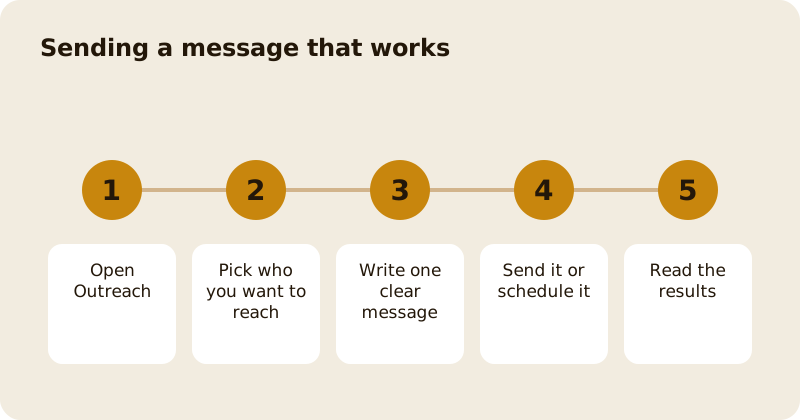
Outreach, in the sidebar, is how you reach guests who agreed to hear from you: push notifications, customer groups, automations and referrals. Every audience passes the same consent check, so a guest who has not agreed is never messaged, and a campaign never writes to the same person twice. You need the manage marketing permission, which owners and managers have by default. Free allowances are small on purpose, and anything bigger is a paid campaign.
Who can you message?
Only guests who gave marketing consent for your business. A guest who joins a rewards programme starts with offers on and a switch to turn them off, in Ireland. In Canada, the box starts unticked and the guest must tick it, so a Canadian guest who has not ticked is not in the audience. Email needs its own consent, and every email carries a one click unsubscribe. This is why your audience is smaller than your door count, and why it is worth having.
How do you send a push notification?
Open Push Notifications, choose an audience such as followers, members or recent guests, write the message, and send it or schedule it. Quiet hours and daily deal limits are respected, and a push that cannot be sent as a push still appears in the guest's inbox. Lead with the reason, such as a new autumn menu from Thursday, and keep it to one sentence.
What are customer groups?
Customer groups, called CRM in the code, show the people who have dealt with you in ways you can use: regulars, new guests and lapsed ones. Names appear only for guests who agreed to share them with your business; others appear as anonymised rows. You can build a win-back offer for lapsed guests from the list, and the offer is sent only to those who agreed to hear from you. Read which members are worth it for the member view.
What do automations do?
An automation is a message that sends itself when something happens, such as a thank you after a first visit or a nudge when a guest is one stamp from a reward. Each has a cooldown so the same guest is not asked twice. Set a few and review them each quarter. The detail is in automatic customer messages.
How do you read the results?
Campaign results show sends, opens, taps and the orders, payments and bookings that followed within 48 hours. The last message a guest received gets the credit. The numbers are counts and money, not names, so you can judge a campaign without seeing who acted. For referrals, see refer a venue to Mosey.
How do you start without wasting your allowance?
Begin with one message to followers about something real, such as a new menu or an event, and read the results before you send a second. Then set up two automations, a thank you and a win-back, and leave them alone for a month. See get discovered on Mosey for how followers find you in the first place.
What should you not send?
Do not send more than you would want to receive, and never to a list you bought or built from business cards. One useful message a fortnight beats a daily one, because guests who mute you are gone for good.
Questions
Common questions
Who can I send a push notification to?
Only guests who gave marketing consent for your business. Every audience goes through the same consent check, and a guest who has not agreed is left out.
Why is my audience smaller than my customer list?
Because only guests who agreed to hear from you are included, and email needs a second consent. The audience is smaller but it is the one you are allowed to message.
Can I see the names of my customers?
Only where a guest agreed to share their name with your business. Other guests appear as anonymised rows, and counts about them are still shown.
What are automations?
Messages that send themselves when something happens, such as a thank you after a first visit. Each has a cooldown so the same guest is not messaged twice.
How do I know a campaign worked?
Campaign results count the sends, opens and taps and the orders, payments and bookings within 48 hours, crediting the last message. They show counts and money, never names.
More like this
Read next
Dashboard: Account and billing, Stripe payouts and your invoices
Account and billing is where you connect Stripe, see what Mosey has charged and why, and download invoices. Your takings go to your own Stripe account, not through Mosey.
Dashboard: Analytics and Mosey picks, what the numbers mean
Analytics shows how people find your business and what they do next. Mosey picks shows where you stand on ratings. Gold is earned from ratings alone and nobody can pay for it.
Dashboard: build your menu, scan it in and declare allergens
Menu Builder is the base for everything you sell. Scan your paper menu, tidy the dishes, choose where each is sold and declare allergens once so every ticket and label carries them.
Dashboard: Catering, requests, quotes, deposits and the calendar
Catering has its own group in the sidebar. A request arrives, you build a quote, the customer accepts, and a deposit holds the date. Here is each screen in order.
Get started
Claim your business free
Free to list, no set-up fee, and Order Ahead is 1.5% commission when you start taking orders.