How to
How to join a waitlist or a walk-in queue on Mosey
Mosey · 23 October 2026 · 3 min read

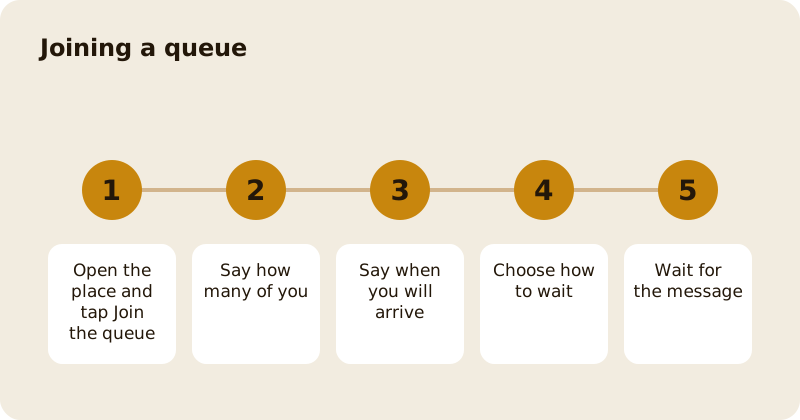
To join a queue on Mosey, open a place that has one, tap Join the queue, say how many of you there are and when you will arrive, choose how you would like to wait and confirm. The standard option adds you to the queue with no fee and tells you when your table is close. Some places offer paid options that move you forward or keep a table for you. The app shows each fee before you pay, and what is refunded if the place cannot take you.
What is the queue for?
It is for places that are full at the moment you want to eat. Instead of standing at the door, you join from your phone and carry on with your evening. The place sees how many are waiting and calls you when a table is close. Many places run the queue for walk-ins on the day; others have a waitlist for a date that is already booked up.
How do you join?
Open the place and tap Join the queue. The screen tells you that you will be notified as your turn gets close. Then:
- How many of you? Choose the party size.
- When will you arrive? Choose Here now, On my way, or an arrival time in minutes.
- How would you like to wait? The options depend on the place.
What are the waiting options?
Add me to the queue. The standard option: you are told when your table is close, and there is no fee.
I'll be there within an hour. You go to the front of the queue for the next hour. The place may charge a fee, which is refunded if the place cannot take you. Where the place does not charge, the screen says No fee.
Keep a table for me. You pay an amount to keep a table once you are called. It is refunded if the place cannot take you, and kept if you do not arrive in time.
The screen shows the amount on the button, for example Pay and join, so you know before you pay.
What happens next?
The queue status screen shows your place and the current wait. You get a notification as your turn gets close. If the place is closed when you try, it tells you that its queue is not taking joins. If the place offers a table, go there when you are called.
What if something goes wrong?
If you pay a hold fee and the app cannot add you to the queue, it says so. In that case your fee went through but you were not added; try joining again and you will not be charged twice. If the place refused you, the app tells you that it has refunded your hold fee, or that the refund is on its way. If a payment cannot be reused, start again to join the queue.
Can you leave the queue?
Yes, open the queue status and leave it. Whether any fee is refunded depends on the option you chose and the place's rules, which the screen shows when you join.
Is there a difference between a queue and a booking?
Yes. A booking is for a time you chose in advance and is covered in booking a table. A queue is for now. If a place is full on a night you want, you can also set a cancellation alert.
Related reading: joining a waitlist for a full restaurant, skipping the queue with walk-in dining and the reservations feature page.
Questions
Common questions
How do I join a queue on Mosey?
Open a place that has a queue, tap Join the queue, choose your party size, say when you will arrive and choose how you would like to wait. You are notified as your table gets close.
Does it cost anything to join?
The standard option, Add me to the queue, has no fee. Some places offer paid options that move you forward or keep a table, and the amount is shown on the button before you pay.
What if the place cannot seat me?
For the paid options, the fee is refunded if the place cannot take you. If a hold fee is taken and you are not added, the app says so and you can try again without being charged twice.
Do I need to be at the place?
You can say you are Here now, On my way or arriving in a number of minutes. The place sees this and uses it to plan the queue.
How do I leave the queue?
Open the queue status and leave it. Whether a fee is refunded depends on the option you chose and the place's rules, which the screen shows when you join.
More like this
Read next
How restaurant deposits and cancellation policies work in Ireland
Why places ask for a deposit, when you get it back, what a card hold means, and what to do when plans change. Restaurant deposits from the diner's side of the table.
Bank holiday weekend eating out: how to avoid disappointment
Bank holiday weekends are busy and hours change. Here is how to book, check opening times and find a table when you are caught out.
Coeliac and gluten free eating out: what to ask
Eating out gluten free depends on the kitchen's answers. Here are the questions that matter and how to read what you are told.
Easter weekend eating out: planning tips
Easter weekend means changed hours and busy rooms. Here is how to check, book and keep a backup for a family meal.