How to
How to find events and buy tickets on Mosey
Mosey · 23 October 2026 · 3 min read

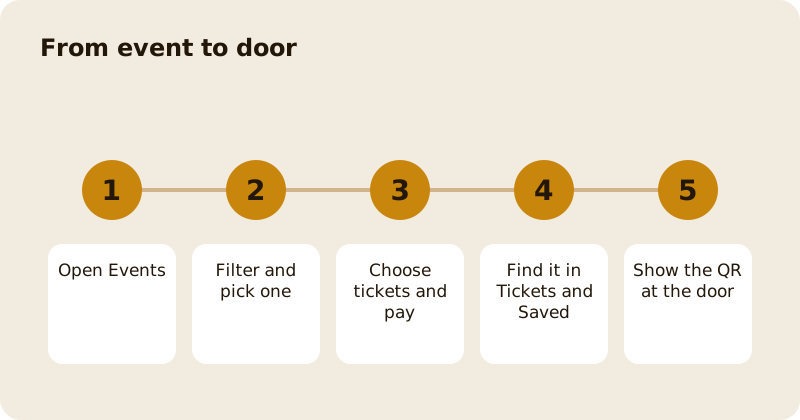
To find events on Mosey, open Events from Home, filter by date, type, price or rating, and open one to read about it. Choose the number of tickets, pay with your card, or claim a free ticket, and find it under Tickets and Saved in the You menu. At the event, show the QR at the door. You can add the event to your calendar, save events for later, transfer a ticket to a friend and, in many cases, cancel or ask for a refund.
How do you find events?
Open Events from the Home categories, where a count shows how many events are on this week. The page offers chips for All, This weekend, Free, Top rated, Gatherings and Earns loyalty, with a List view and a Calendar view, and a search box. Filters cover date and time, event type, capacity and audience, budget and location, and rating.
Each event shows the place, the date, the price, how many tickets have sold out of the capacity, and whether it is sold out. Some events carry early bird pricing with the days left, members' early access, a minimum party size or bar credit included in the ticket.
How do you buy tickets?
Open the event, choose the quantity with the ticket selector, and pay with your card. You must be signed in to buy. For a free event, tap Claim free ticket; you can claim up to a stated number of places, including your own. If the event is sold out, you may be able to join a waitlist.
A small booking fee may be added at checkout and is shown before you pay.
Where are your tickets?
Open the You menu and go to Tickets and Saved. The Tickets tab lists upcoming and past tickets, with promotions and events in separate sections. Each ticket has Show QR at door, Add to calendar, and, where allowed, Transfer to a friend and Request refund or Cancel. The Saved tab keeps events you bookmarked with the bookmark icon; the Gifts tab holds tickets, promotions and vouchers friends have sent you.
What happens at the door?
Open the ticket and tap Show QR at door. Staff scan it. If the ticket is for several people, everyone on it is checked in together; the app tells you if everyone on the ticket is already in. Some events assign tables, shown as Table and a number, or Table assignment to follow.
Can you cancel or get a refund?
It depends on the event. Where the organiser allows it, you see Cancel for a full refund, with the date until which you can cancel, and your refund is on its way to your card within a few days. If the event has a waitlist, you may see Give this ticket back, which gives your place to someone on the waitlist. Otherwise choose Request refund: the place reviews every request before any refund is issued, and you are notified when they reply. If the event is cancelled by the place, tickets are refunded to the card.
Can you give a ticket to a friend?
Choose Transfer to a friend, and pick the person. A ticket a company gave you as a gift cannot be refunded or transferred, but it still has its QR for the door.
Can you share an event?
Yes. Share an event with a friend with the share button; the card shows the host, the location and the price, and a QR to get the ticket.
If you are going with a group, order together before you go. Related reading: what events are happening in Dublin, planning a group celebration with gatherings and the events feature page.
Questions
Common questions
Where are my event tickets?
Open the You menu and go to Tickets and Saved. The Tickets tab lists upcoming and past tickets, each with a QR to show at the door.
Can I cancel an event ticket?
Where the organiser allows it, the ticket shows Cancel for a full refund with the last date. Otherwise choose Request refund and the place reviews it. A cancelled event is refunded to your card.
Can I give my ticket to a friend?
Yes, choose Transfer to a friend. A ticket a company gave you as a gift cannot be transferred or refunded but still works at the door.
How do I get into the event?
Open the ticket, tap Show QR at door and staff scan it. For a ticket covering several people, everyone on it is checked in together.
What if an event is sold out?
You may be able to join the waitlist. Tell the app you want a place and it lets you know if one becomes free.
More like this
Read next
How restaurant deposits and cancellation policies work in Ireland
Why places ask for a deposit, when you get it back, what a card hold means, and what to do when plans change. Restaurant deposits from the diner's side of the table.
Bank holiday weekend eating out: how to avoid disappointment
Bank holiday weekends are busy and hours change. Here is how to book, check opening times and find a table when you are caught out.
Coeliac and gluten free eating out: what to ask
Eating out gluten free depends on the kitchen's answers. Here are the questions that matter and how to read what you are told.
Easter weekend eating out: planning tips
Easter weekend means changed hours and busy rooms. Here is how to check, book and keep a backup for a family meal.