How to
How to find and apply for a job on Mosey Jobs
Mosey · 23 October 2026 · 3 min read

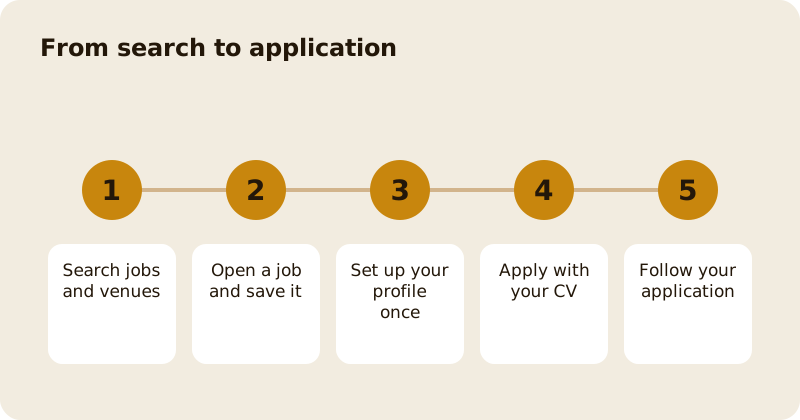
Mosey Jobs is a website for finding work at food places. Search by role and location, open a job to read it, save the ones you like and apply with your CV. You build a profile once, with a photo, your name and a headline, and each application is tracked so you can see its status. You can set alerts for the roles you want and follow places that are hiring. It is free for workers.
Where is it?
Mosey Jobs is a website at jobs.moseyfoodfinder.com. On a place's page in the Mosey app, a Now hiring label opens Mosey Jobs in your browser. You can read jobs without an account; you sign in to save, apply or set alerts.
How do you search?
The home page has a search with filters, and the results show as cards with the place, the role, key details and a bookmark. You can also browse by venue, at Browse venues, to see a place's page with its open jobs. Location search suggests places as you type.
What is on a job page?
The role, the place, pay and hours where the place has given them, and sections for the description, responsibilities, requirements and nice to have. A save button keeps the job. An Apply button starts your application.
How do you set up your profile?
When you first sign up, a short wizard asks for a photo and your name, and a headline that says what you do. Your profile is read by places you apply to, so keep it honest and current. You can edit it any time from your profile, and account settings is where you change your email or password.
How do you apply?
Tap Apply. A form asks for a short message and your CV, which you can drag in or choose. If you uploaded a CV before, it is pre-filled. Some jobs ask for work samples, such as photos or a short video of your work, and the form tells you what is needed. When you send it, the page shows that your application has been sent.
How do you follow an application?
Open Applications. Each application shows a status, such as applied, considered or hired, and you can open it for details and messages from the place. If the place wants to talk, you get a notification.
What happens when you are hired?
Saved shows the jobs and venues you saved, and Alerts let you set up roles and places you care about so that you are told when a matching job appears; you can change or remove alerts at any time. When a place hires you,
The place can add you to its team, and you get a My employment space on the website. It holds your onboarding tasks, your contract, which you can sign in the browser, your documents, any training you have been given, your rota and, if the place uses it, your tips. You see only your own information. See how to join a company's staff directory for the other kind of invitation.
Can you take courses, and is your data safe?
The Courses area has training you can take for work in food, and a place can assign a course to you; a completed course is added to your record. Your CV and documents are stored privately. Places see them only when you apply or when you are on their team. Delete your account or ask for your data from your account settings or through Mosey's privacy page. See controlling your privacy and data.
Related reading: find your perfect job in hospitality in Ireland and the courses feature page.
Questions
Common questions
Is Mosey Jobs free for workers?
Yes. You can search, save, apply and set alerts without paying. You need an account to save jobs, apply and set alerts, but reading jobs is open.
How do I apply for a job?
Open the job, tap Apply, add a short message and your CV, and send it. If you uploaded a CV before it is pre-filled. Some jobs also ask for work samples.
Where do I see my applications?
Open Applications on the website. Each one shows a status and lets you open its details and any messages from the place.
Can I get alerts for jobs?
Yes. Set up alerts for the roles and places you care about and you will be told when a matching job appears.
What is My employment?
A space on the website for people who have been added to a place's team. It holds onboarding tasks, your contract, documents, training, your rota and, where used, tips.
More like this
Read next
How restaurant deposits and cancellation policies work in Ireland
Why places ask for a deposit, when you get it back, what a card hold means, and what to do when plans change. Restaurant deposits from the diner's side of the table.
Bank holiday weekend eating out: how to avoid disappointment
Bank holiday weekends are busy and hours change. Here is how to book, check opening times and find a table when you are caught out.
Coeliac and gluten free eating out: what to ask
Eating out gluten free depends on the kitchen's answers. Here are the questions that matter and how to read what you are told.
Easter weekend eating out: planning tips
Easter weekend means changed hours and busy rooms. Here is how to check, book and keep a backup for a family meal.