How to
How to control your privacy and your data on Mosey
Mosey · 23 October 2026 · 3 min read

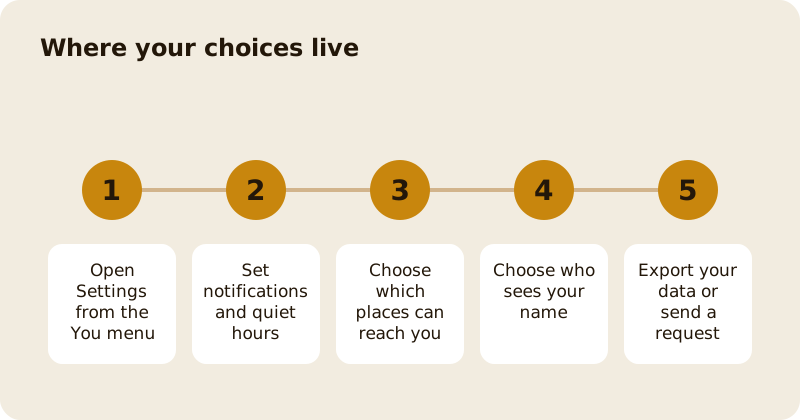
On Mosey you control who can reach you and who sees your name. In Settings you set your notification preferences, daily limits and quiet hours, choose which followed places may notify you about events and promotions, decide which places can see your name in their customer list, export your data and send a privacy request. Places never see your email address or phone number through Mosey.
Where do you find the settings?
Tap your profile picture to open the You menu and go to Settings. The notification, communication and account settings are there, with Help and Support and your Mosey Card.
How do you control notifications?
Under Notifications, switch push notifications on or off, and choose categories: Order updates (confirmations and status changes), Social activity (likes on your ratings and new followers), and Promotions and events (new promotions and upcoming events). Nearby notifications, which cover events, promotions and new places near you, are off by default. If you turn them on, you choose a radius, and whether to limit them to places you follow. Set a daily limit and quiet hours, from and until, so you are not disturbed.
If your device blocks notifications, the app tells you to turn them on in your device settings.
How do you choose which places can contact you?
Open Communications. Places you follow, and places you are a customer of, can send you offers and news. The page lists those places, and you can turn each one off. Switching one off stops its notifications without affecting your following or your account. There is also an email option for each place, so its offers reach your inbox too; every email has an unsubscribe link.
When you first interact with a place, the app may ask Hear from this place? with Yes, notify me or Not now. It adds that the place will not see your name or email unless you book or order, and that you can change it any time in Settings.
Who sees your name?
You choose which places can see your name in their customer list. In Communications, the Share your name switch for each place lets it see your name. Places never see your email or phone number. Without sharing, a place sees a reference rather than your name. The place of your booking or order sees what it needs to serve you.
How do you export your data?
Open Settings and find the Export my data option under your account. Mosey prepares a file with the data it holds about you. If it fails, the app asks you to try again. You can also use the website's privacy request page, which lets you ask for your data, correct it or object to its use, and you will be asked to verify your email.
How do you send a privacy request?
Use the privacy request page on the website, or contact Mosey from Help and Support, where there is a card for Data and privacy for GDPR requests, data access or privacy concerns. Say what you need and from which email address. Requests are verified before anything is shared. The privacy page explains the legal basis and your rights.
What about blocking and reporting?
You can block accounts you do not want to hear from (Blocked accounts in Settings), and report content that breaks the rules. Blocked people cannot message or follow you.
What about deleting your account?
See how to delete your account.
Related reading: member letters and the weekly digest for the marketing choices that apply to members, and the help page.
Questions
Common questions
Can places see my email or phone number?
No. Places never see your email address or phone number through Mosey. They see your name only if you choose to share it with that place.
How do I stop a place sending me offers?
Open Communications in Settings and turn that place off. Switching a place off stops its notifications without affecting your following or your account.
What are quiet hours?
A period you choose in Notifications, from a time until a time, when Mosey will not notify you. You can also set a daily limit.
How do I download my data?
Open Settings and choose Export my data, or use the privacy request page on the website. Requests are verified before any data is shared.
Who do I contact about privacy?
Use Help and Support in the app, where a card covers data and privacy requests, or the website's privacy request page.
More like this
Read next
How restaurant deposits and cancellation policies work in Ireland
Why places ask for a deposit, when you get it back, what a card hold means, and what to do when plans change. Restaurant deposits from the diner's side of the table.
Bank holiday weekend eating out: how to avoid disappointment
Bank holiday weekends are busy and hours change. Here is how to book, check opening times and find a table when you are caught out.
Coeliac and gluten free eating out: what to ask
Eating out gluten free depends on the kitchen's answers. Here are the questions that matter and how to read what you are told.
Easter weekend eating out: planning tips
Easter weekend means changed hours and busy rooms. Here is how to check, book and keep a backup for a family meal.