How to
How to delete your Mosey account, and what happens to your data
Mosey · 23 October 2026 · 4 min read

To delete your Mosey account, open Settings from the You menu and choose Delete account. Your account closes straight away and is deleted for good after 14 days; sign back in before then to keep it. A few things must be sorted first: an upcoming table booking, an event ticket you have paid for, an unfinished contractor booking and the last admin role in a company. Unused voucher balance is lost, so spend it first.
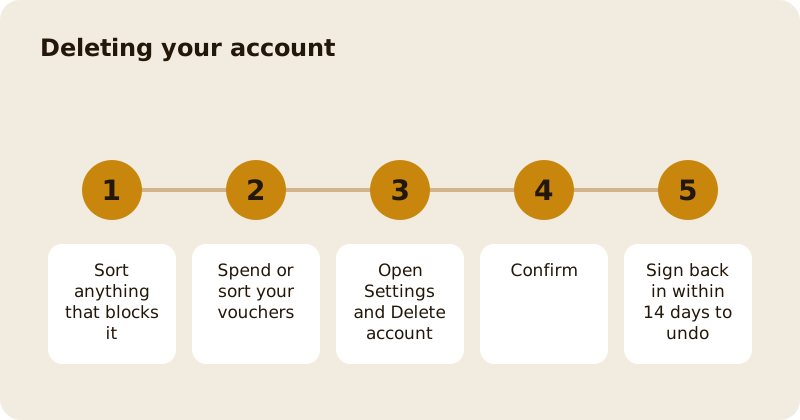
Where do you delete the account?
Tap your profile picture to open the You menu, go to Settings and find the danger section. Delete account is there, with a description that your account closes now and is deleted after 14 days, and that you can sign back in before then to keep it. Export my data is next to it if you want a copy first; see controlling your privacy and data.
What blocks deletion?
The app checks before it deletes, and tells you what to do first:
- An upcoming table booking. Cancel it from My Bookings first.
- An upcoming catering booking. Cancel it first.
- A paid contractor or creator booking that is not finished. Finish or cancel it first.
- An upcoming gathering. Cancel it from My Bookings first. If you have paid towards a gathering, ask the organiser to cancel it, or wait until it has happened.
- A ticket to an upcoming event. Ask for a refund first, or wait until the event has happened.
- A paid offer you have not used. Use it, or ask the place for a refund.
- A paid course you can still get a refund for, or a class that has not happened yet.
- Being the last admin of a company on Mosey for Teams. Make someone else an admin, or close the company in the Mosey for Teams web app first.
The screen titled You can't delete your account yet lists these. Fix them and try again.
What about money you have on vouchers?
Any unused voucher balance will be lost when your account is deleted, so spend it first. If you still have money on vouchers, the app tells you which places hold it and asks you to confirm that you understand it will be lost before it goes ahead. Gifts you have already sent stay with the people who got them.
What happens to your loyalty and memberships?
Loyalty points are forfeited. Memberships that you hold should be cancelled first; see pausing or cancelling a membership.
What happens to your ratings and lists?
The confirmation says that loyalty points will be forfeited and that gifts you have already sent stay with the people who got them. What happens to the ratings, photos and lists you posted, and to the records that places and Mosey must keep by law, such as an order or a payment, is set out in the privacy page. Read it before you delete if you want to know the detail, and ask Mosey from Help and Support if it is not clear.
Can you change your mind?
For 14 days, yes. Sign back in with the same email and password and your account is restored. After 14 days it is gone, and you would need to start a new account.
What if you cannot delete it in the app?
If the app cannot delete your account, it says so and asks you to try again or contact support. You can also send a request through the website's privacy request page, or from Help and Support, where a card covers data and privacy requests. Requests are verified before anything is done.
What should you do before you go?
Export your data if you want a copy, spend your vouchers, cancel memberships, use or refund anything that is paid for, and tell friends who share lists with you. When you are sure, choose Delete account and confirm.
Related reading: the help page and how to contact Mosey.
Questions
Common questions
How do I delete my Mosey account?
Open Settings from the You menu and choose Delete account. Your account closes at once and is deleted for good after 14 days. Sign back in before then to keep it.
Why can I not delete my account?
The app checks first. An upcoming booking, a ticket to an upcoming event, an unfinished contractor booking, a paid offer you have not used, or being the last admin of a company must be sorted first. The screen lists what to do.
What happens to my voucher balance?
It is lost when the account is deleted, so spend it first. The app shows which places hold it and asks you to confirm you understand before it goes ahead.
Can I undo the deletion?
Yes, for 14 days. Sign back in with the same email and password and the account is restored. After 14 days it is gone.
Do I get a copy of my data?
Choose Export my data in Settings before you delete. You can also send a request through the website's privacy request page.
More like this
Read next
How restaurant deposits and cancellation policies work in Ireland
Why places ask for a deposit, when you get it back, what a card hold means, and what to do when plans change. Restaurant deposits from the diner's side of the table.
Bank holiday weekend eating out: how to avoid disappointment
Bank holiday weekends are busy and hours change. Here is how to book, check opening times and find a table when you are caught out.
Coeliac and gluten free eating out: what to ask
Eating out gluten free depends on the kitchen's answers. Here are the questions that matter and how to read what you are told.
Easter weekend eating out: planning tips
Easter weekend means changed hours and busy rooms. Here is how to check, book and keep a backup for a family meal.