How to
How to rate a place and add photos on Mosey
Mosey · 23 October 2026 · 4 min read

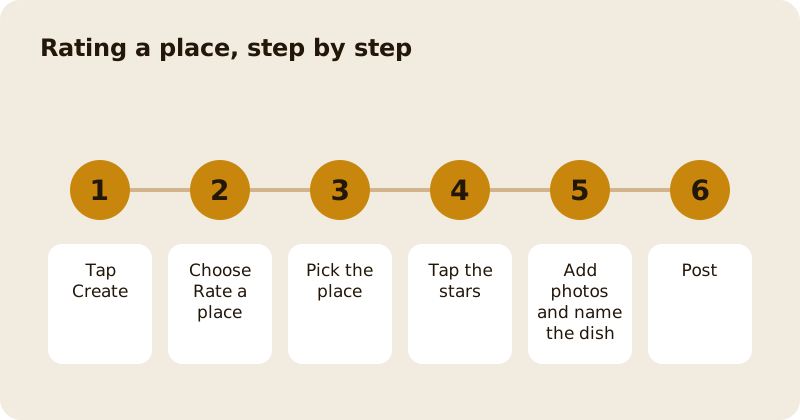
To rate a place on Mosey, tap Create in the bottom bar, choose Rate a place, pick the place, tap the stars and post. You can add photos, name the dishes you had and add a few tags to help others find the place. A rating is about one meal, so rate what you ate on the day you ate it, and the place's page shows it straight away.
How do you start a rating?
Open the Mosey app and tap Create, the plus in the middle of the bottom bar. Mosey asks what you would like to create. The first choice, Rate a place, is described as stars, photos and a few words about one meal. Two other ways to share sit under it: Rate as you go, which captures the meal a bit at a time while you eat, and Share a drop, which puts photos from more than one place into one post with quick ratings.
Choose Rate a place. If you are signed out, the app asks you to sign in or create an account first.
How do you pick the place?
Tap Pick a place and search for the name. If you started from a place's own page, it is already chosen, and you can change it with Change. If the app asks you to pick the place again, it has lost track of which one you meant; choose it again and carry on.
How do you give it stars?
Tap the stars to rate it. Mosey will not let you post without them: it reminds you to tap the stars first. Rate the meal you had, not the reputation of the place, and not the service alone. Other people read your rating when they decide where to eat, and the dishes you name help the next person decide what to order.
How do you add photos and name the dish?
Tap Add photos, and allow the app to see your photos when it asks. Choose up to the number the app allows, which it tells you on screen. Tap a photo to name the dish, either by choosing it from the menu or by typing the name. If the menu has no dish yet, tap Add a dish. If the place has no menu on Mosey, you can scan one to add missing items.
Photos of the food are the most useful. A photo of the place helps too, but a blurred shot of a plate you ate half of is worth less than a clear one.
How do you add tags and post?
After the stars you can add tags, which are optional. They help others discover the place, for example for a date night or a family meal. Add the ones that are true. Then tap post. If the rating contains language Mosey cannot publish, the app tells you and asks you to give it another go. If you are restricted from posting, it tells you that too and points you to support. Once it posts, you see a message that your rating is live, and everyone looking at the place can see it. Mosey may then offer to add the place to one of your lists.
What if you are in the middle of a meal?
Tap Save for later. What you have added stays on your phone for a while, so you can pick it up again. If you leave the screen without saving, the app asks whether to keep it for later, discard it or keep editing.
Can you change a rating?
Yes. Open your rating from your profile and edit it. The app confirms with a short message that the rating has been updated. If you visit the same place again, you can rate the new visit.
What happens after you rate?
Your rating appears on the place's page and in your profile. It counts towards your badges and streaks, and the place can reply to it, which is a public reply under the place's name. Read what a Mosey rating means and how badges and streaks work. If you want to tag the people you ate with, see tagging the people you ate with, and the ratings feature page explains the idea in full.
Questions
Common questions
How do I rate a restaurant on Mosey?
Tap Create in the bottom bar, choose Rate a place, pick the place, tap the stars and post. You can add photos, name the dishes and add tags before you post.
Can I save a rating and finish it later?
Yes. Tap Save for later and what you have added stays on your phone for a while so you can pick it up again. If you leave the screen, the app asks whether to keep it or discard it.
Why was my rating not posted?
Mosey asks you to tap the stars first, and it does not publish language it cannot publish. If you are restricted from posting, the app says so and points you to support.
Can I edit a rating after I post it?
Yes. Open it from your profile and edit it. The app confirms that the rating has been updated.
Can a place reply to my rating?
Yes. A place can reply under its own name, and you get a notification the first time it does. Replies are public.
More like this
Read next
How restaurant deposits and cancellation policies work in Ireland
Why places ask for a deposit, when you get it back, what a card hold means, and what to do when plans change. Restaurant deposits from the diner's side of the table.
Bank holiday weekend eating out: how to avoid disappointment
Bank holiday weekends are busy and hours change. Here is how to book, check opening times and find a table when you are caught out.
Coeliac and gluten free eating out: what to ask
Eating out gluten free depends on the kitchen's answers. Here are the questions that matter and how to read what you are told.
Easter weekend eating out: planning tips
Easter weekend means changed hours and busy rooms. Here is how to check, book and keep a backup for a family meal.