How to
How to follow a food trail and collect stamps
Mosey · 23 October 2026 · 4 min read

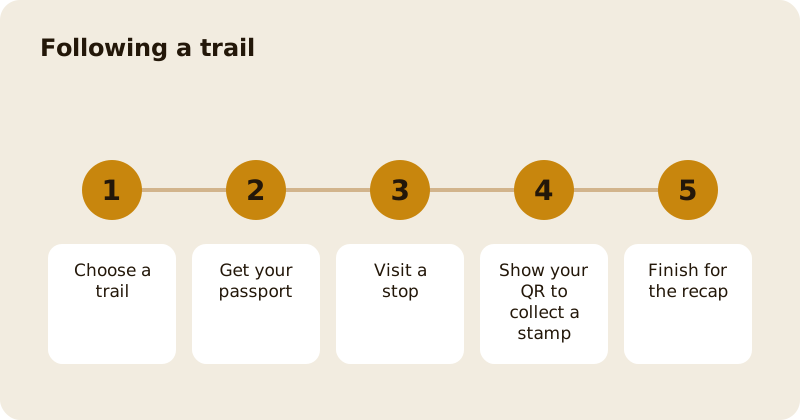
A food trail is a route of places chosen by a place, a local or a creator. Pick a trail, get your passport, visit the stops in any order the trail allows and collect a stamp at each by showing your trail QR to staff or tapping the Mosey tag. When every stop is stamped, you get a recap, your photos and any reward. If you change your mind before your first stamp, you can leave and get your money back.
Where do you find trails?
Open the Trails page from Home. It lists Your active trails and Trails near you, with sections such as Near you, From people you follow, New this week, Popular, On for a limited time and By theme. If location is off, turn it on to see trails near you; if there are none, the page says places are adding trails all the time.
Each trail page shows the stops, the route, the time it takes to finish, an about section and what people thought, with an average rating out of five.
How do you join one?
Some trails are free and some are paid. On a paid trail, you buy a ticket for the number of people, and a trail passport is created. The page tells you the refund rule: a full refund within a number of hours, as long as you have not collected a stamp. If a trail is sold out or not open yet, tap Tell me and the app nudges you when tickets are available.
How do you collect a stamp?
At each stop, open your passport and tap Show my QR. Staff scan it to stamp your passport. The note on the screen says the code refreshes automatically and that you need to be at the place to get a stamp. At places that use a Mosey tag, you tap your phone on the tag instead. If you have no signal, the app shows your saved code, which works until the time shown. A ticket for several people is shown once at each stop, and staff serve all of you.
When a stamp is collected, you see Stamp collected and the name of the place. A stamp may earn you an offer at that stop, which the message tells you about. The passport shows how many stops you have stamped, for example 3 of 5, and can show your photos from each stop.
What do you get at the end?
When every stop is stamped, the passport shows Trail completed and a recap: when you finished, where you went, your photos and any reward, such as a voucher saved to your vouchers. You can rate the trail, and trail badges track the number you have completed. Read badges, streaks and your food year for how they fit together.
Can you leave a trail?
Yes. Open the passport and tap Leave this trail. If you have not stamped any stops, you can get a full refund, and the app tells you that any payment has been refunded. If the trail was a gift, the refund goes back to the person who bought it. Once you have a stamp, the refund rule no longer applies. If a trail is paused or has ended, the passport tells you and, if there is a refund, how to get it.
Can you make your own trail?
Yes. The Trails page has Make a trail, which turns a list of your places into a route others can follow. Tap Start and follow the steps.
What if a stamp does not work?
Make sure you are at the place and your QR has refreshed. Ask staff to try again, or check your connection. A place can also stamp you manually.
Related reading: doing a food trail in Cork, a self-guided food trail through Kilkenny and the food trails feature page.
Questions
Common questions
How do I collect a stamp on a trail?
Open your passport at each stop and tap Show my QR for staff to scan, or tap your phone on the Mosey tag where the place uses one. You need to be at the place to get a stamp.
Can I get a refund if I change my mind?
Yes, if you have not collected a stamp. Open the passport and tap Leave this trail. The trail page shows the refund window, and a gifted trail refunds the person who bought it.
What if I have no signal at a stop?
The app shows your saved code, which works until the time shown on the screen. Staff can scan it as usual.
What do I get for finishing?
A recap with your photos and where you went, any reward such as a voucher saved to your vouchers, and progress towards trail badges. You can also rate the trail.
Can I do a trail with friends?
A ticket can cover several people. Show it once at each stop and staff serve all of you.
More like this
Read next
How restaurant deposits and cancellation policies work in Ireland
Why places ask for a deposit, when you get it back, what a card hold means, and what to do when plans change. Restaurant deposits from the diner's side of the table.
Bank holiday weekend eating out: how to avoid disappointment
Bank holiday weekends are busy and hours change. Here is how to book, check opening times and find a table when you are caught out.
Coeliac and gluten free eating out: what to ask
Eating out gluten free depends on the kitchen's answers. Here are the questions that matter and how to read what you are told.
Easter weekend eating out: planning tips
Easter weekend means changed hours and busy rooms. Here is how to check, book and keep a backup for a family meal.